

Àpèjúwe
CustomerEagle is an AI-powered customer support platform: a chat widget for your visitors, a unified agent inbox, an AI assistant trained on your own knowledge base, and a help center — all in one place.
This plugin adds the CustomerEagle chat widget to your WordPress site without touching your theme:
- One-minute setup — paste your Workspace ID and youÌtumọ̀ Yorùbá: ’re live.
- AI answers, human handoff — the widget answers from your knowledge base and hands off to your team when needed.
- Help-center search built in — visitors find articles without leaving the page.
- Page rules — hide the widget on specific paths (checkout, account pages, …).
- No performance tax — one deferred script tag, loaded only on pages where the widget should appear. Nothing loads in your admin area.
You need a CustomerEagle account to use this plugin — plans (including a free plan) are available at customereagle.com.
Developer filters
custeagle_should_display— final say over whether the widget loads on a request.custeagle_api_base— override the widget endpoint (https only; for staging setups).
External services
This plugin embeds the CustomerEagle chat widget, a third-party service operated by CustomerEagle. When the widget is enabled, every visitorÌtumọ̀ Yorùbá: ’s browser loads the widget script from api.customereagle.com and connects to the same domain for chat.
- What is sent: the Workspace ID configured in the plugin, the visiting pageÌtumọ̀ Yorùbá: ’s domain (used to verify the widget is allowed to run there), and — only when a visitor uses the chat — the messages and any contact details they choose to type. The plugin itself sends no data server-side and stores nothing about your visitors in WordPress.
- When: on every public page view where the widget is enabled (script load), and during chat use.
- Service: CustomerEagle — Privacy Policy · Terms of Service
If you are subject to GDPR or similar regulations, mention CustomerEagle in your siteÌtumọ̀ Yorùbá: ’s privacy policy.
Àwọn àwòrán ìbòjú
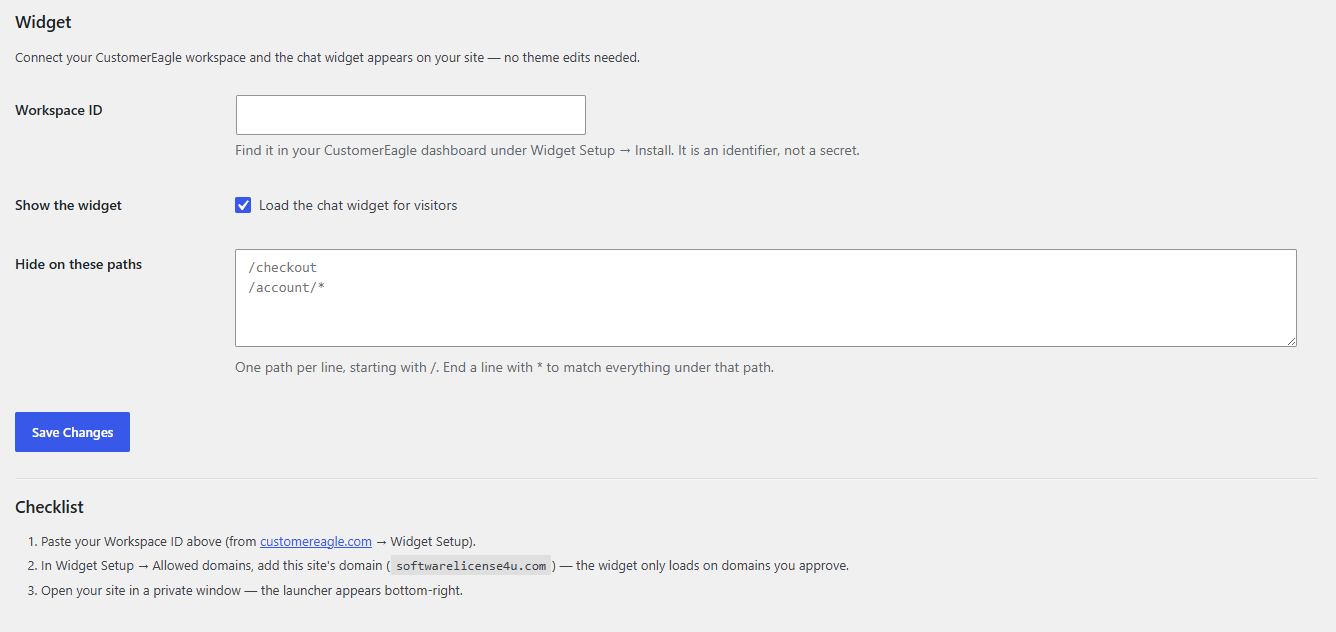
Ìgbéwọlẹ̀
- Install and activate the plugin (Plugins Add New search “CustomerEagle”).
- Go to Settings CustomerEagle.
- Paste your Workspace ID — youÌtumọ̀ Yorùbá: ’ll find it in your CustomerEagle dashboard under Widget Setup Install.
- In the CustomerEagle dashboard, add your siteÌtumọ̀ Yorùbá: ’s domain under Widget Setup Allowed domains (the widget only runs on domains you approve).
- Visit your site — the launcher appears in the bottom-right corner.
FAQ
-
Where do I find my Workspace ID?
-
Log in at customereagle.com, open Widget Setup Install. The Workspace ID is shown in the install snippet. It identifies your workspace and is not a secret.
-
The widget doesnÌtumọ̀ Yorùbá: ’t appear — why?
-
The three usual causes, in order: the Workspace ID is missing or mistyped; your siteÌtumọ̀ Yorùbá: ’s domain isnÌtumọ̀ Yorùbá: ’t on the widgetÌtumọ̀ Yorùbá: ’s Allowed domains list in the CustomerEagle dashboard; or a caching plugin is serving an old copy of the page — clear your site cache after saving settings.
-
Can I hide the widget on some pages?
-
Yes — Settings CustomerEagle “Hide on these paths”. One path per line, e.g.
/checkout, or/account/*to match everything under/account/. -
Does this plugin slow my site down?
-
No. It adds a single deferred script tag on eligible pages; the widget loads after your content and only where you enabled it.
-
Does the plugin work without a CustomerEagle account?
-
No — the widget is part of the CustomerEagle service. You can start on the free plan at customereagle.com.
-
Is it multisite compatible?
-
Yes. Each site configures its own Workspace ID under its own Settings CustomerEagle.
Àwọn àgbéyẹ̀wò
Kò sí àwọn àgbéyẹ̀wò fún plugin yìí.
Àwọn Olùkópa & Olùgbéejáde
“CustomerEagle Chat Widget” jẹ́ ètò ìṣàmúlò orísun ṣíṣí sílẹ̀. Àwọn ènìyàn wọ̀nyí ti ṣe ìkópa sí plugin yìí.
Àwọn Olùkópa
Túmọ̀ “CustomerEagle Chat Widget” sí èdè rẹ.
Ṣe o nífẹ̀ẹ́ sí ìdàgbàsókè?
Ṣàwárí koodu, ṣàyẹ̀wò ibi ìpamọ́ SVN, tàbí ṣe àgbékalẹ̀ sí àkọsílẹ̀ ìdàgbàsókè nípasẹ̀ RSS.
Àkọsílẹ̀ àwọn àyípadà
1.0.0
- Initial release: widget embed, enable toggle, per-path exclusions, multisite-aware uninstall cleanup.