

Àpèjúwe
ePayVista Payments is a payment processor for WooCommerce, built for any ecommerce business — instant approval, no KYC, at a flat ~1% fee (volume tiers available), among the lowest around. It also specializes in approving high-risk verticals that mainstream processors decline, including vape, adult, forex/trading, gambling, supplements, subscriptions, and info products. Customers check out with Visa, Mastercard, Amex, Apple Pay, or Google Pay on a secure hosted page, with no chargebacks. A direct crypto payment option is also available.
Setup is 100% self-serve: enter the wallet address where you want to be paid, click Connect, and your processor account is provisioned automatically — no business paperwork, no waiting on underwriting. Customers pay on ePayVistaÌtumọ̀ Yorùbá: ’s hosted checkout and are returned to your store; signed webhook callbacks confirm each payment and update the order.
Live payment tracking (new in 2.5.0)
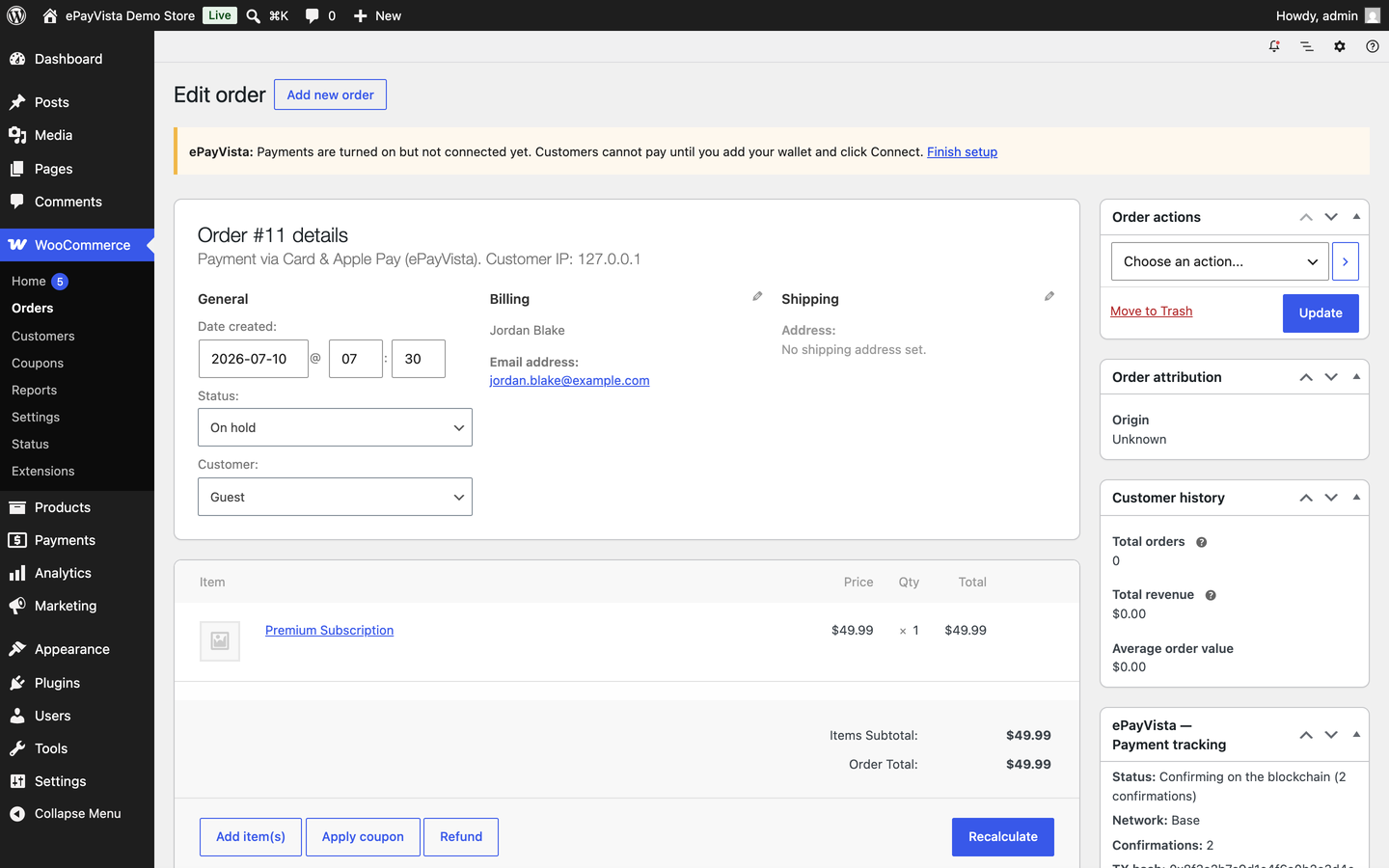
- A Payment tracking panel on every order in your dashboard — status, amount, network, on-chain confirmations, transaction hash, and a one-click block-explorer link.
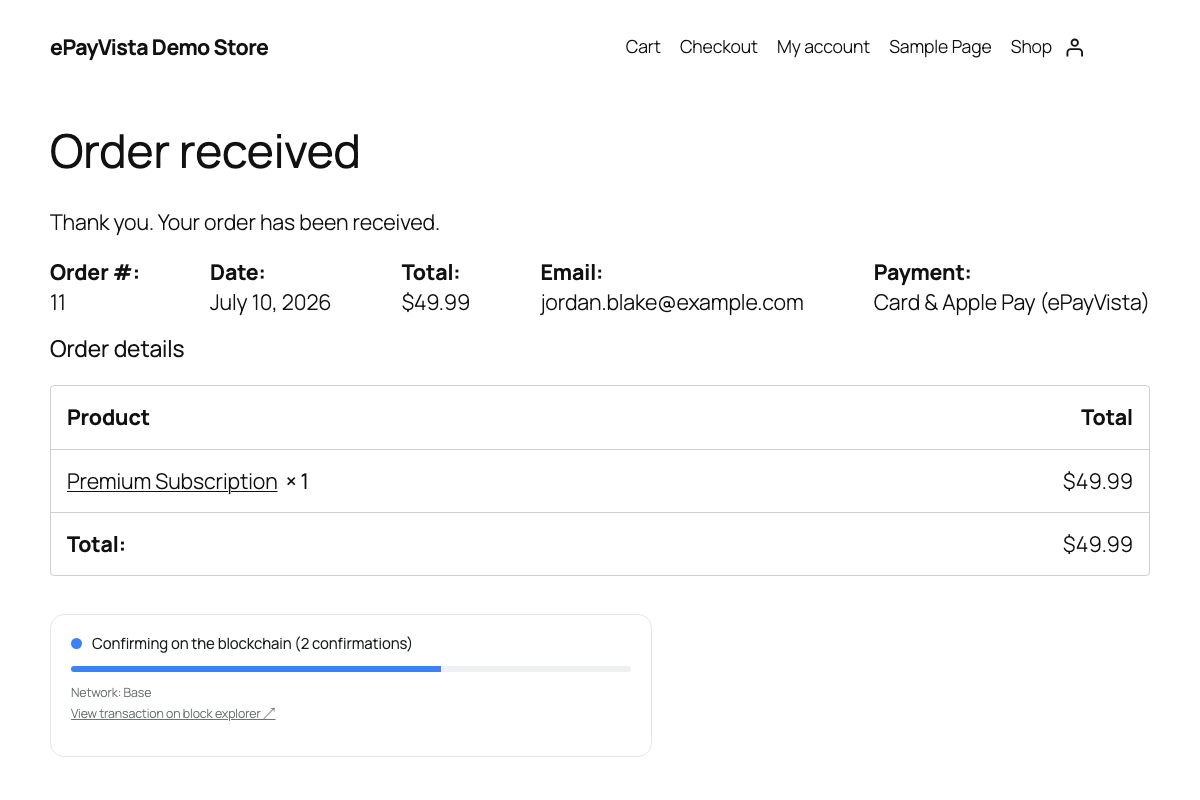
- A live status widget on the customerÌtumọ̀ Yorùbá: ’s order-received page that updates in real time as the payment confirms (“Detected Confirming Confirmed”).
- A “Track your payment” link added to order emails, plus a
[epayvista_track]shortcode for a standalone tracking page.
Features
- Instant approval, no KYC — 100% self-serve onboarding, no underwriting and no business paperwork to wait on.
- Card, Apple Pay, and Google Pay checkout at a flat ~1% fee — works for any ecommerce business, and approved for high-risk verticals many processors decline.
- Direct crypto payment also available for customers who prefer it.
- Per-method payment modules: offer each hosted option (card, card & wallets, exchange, crypto wallet) as its own payment method at checkout — or the all-in-one hosted page, or both.
- Hosted, PCI-compliant payment page — no card data touches your server.
- HMAC-signed webhook confirmations (no order is marked paid without a verified signature).
- Underpayments are placed on-hold for review instead of auto-completing.
- HPOS (High-Performance Order Storage) and Cart/Checkout Blocks compatible.
This plugin requires a free ePayVista account, which you create directly from the plugin settings (no separate signup or API-key copying).
External services
This plugin connects to ePayVista, a third-party payment processor, to provision your account, create payments, and confirm them — this is required for the plugin to function. When you connect your store, your store details and payout address are sent to ePayVista; when a customer checks out, the order total and their email are sent to create a hosted payment and confirm it. No customer card data is ever sent to or stored by your site — it is handled entirely on ePayVistaÌtumọ̀ Yorùbá: ’s hosted checkout.
Service provider: ePayVista — https://epayvista.com/ | Terms | Privacy Policy
Àwọn àwòrán ìbòjú
Ìgbéwọlẹ̀
- Install and activate WooCommerce.
- Upload and activate ePayVista Payments (Plugins Add New Upload, or install from the directory).
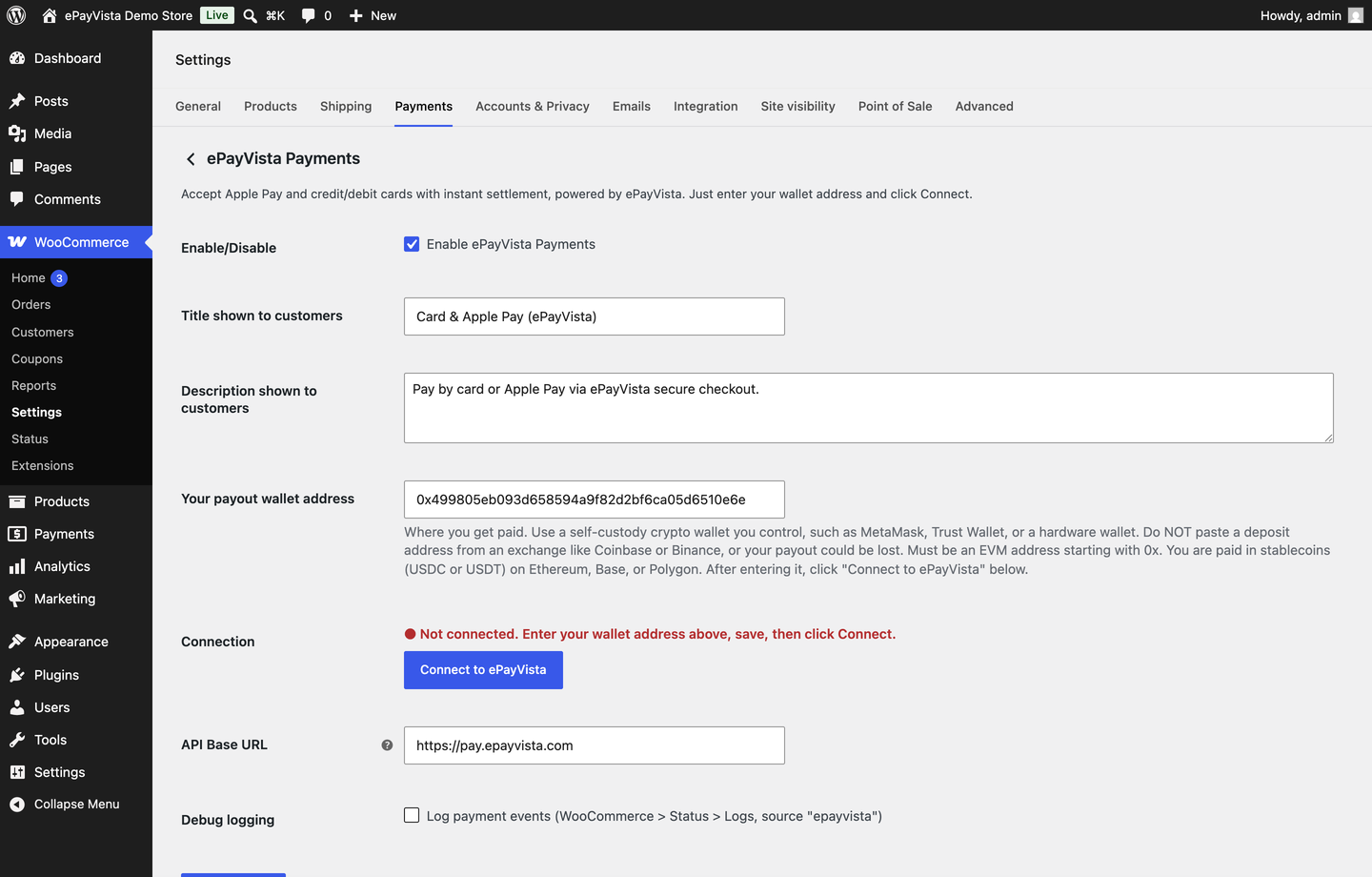
- Go to WooCommerce ePayVista, enter the wallet address where you want to receive funds, click Save changes, then click Connect to ePayVista.
- Go to WooCommerce Settings Payments and enable the ePayVista payment methods you want. YouÌtumọ̀ Yorùbá: ’re ready to take payments.
FAQ
-
Is there an approval process or KYC?
-
No. Click Connect and your processor account is provisioned instantly — no underwriting, no KYC, no business paperwork to submit or wait on.
-
Do I need an ePayVista account?
-
Yes — a free account, created automatically from the plugin settings when you click Connect. You never copy or paste an API key.
-
Where does the money go?
-
Funds are settled in stablecoins to the wallet address you set in the plugin. Settlement is handled on the ePayVista backend.
-
Is card data stored on my site?
-
No. Customers pay on ePayVistaÌtumọ̀ Yorùbá: ’s hosted, PCI-compliant checkout. Your site never sees or stores card details.
-
How are payments confirmed?
-
ePayVista sends a signed (HMAC-SHA256) webhook to your store. Orders are only marked paid when the signature is valid, and the transaction details are stored for tracking.
-
Can customers track their payment?
-
Yes. The order-received page shows a live status widget, order emails include a tracking link, and you can place a
[epayvista_track]shortcode on any page. -
Can I control which payment methods customers see?
-
Yes, two ways. (1) On the all-in-one gateway, tick exactly which options appear on the hosted checkout under “Payment methods shown at checkout” — leave everything ticked (the default) to show all options and let the customer choose. (2) Enable any hosted option as its OWN payment method at your WooCommerce checkout (ePayVista — Pay by Card, Card & Wallets, Buy on an Exchange, Crypto Wallet); the customer picks it in your store and lands on the hosted page already set to that method. The modules share the main gatewayÌtumọ̀ Yorùbá: ’s connection, so you connect once.
-
What currency does ePayVista support?
-
Any major currency. ePayVista prices and settles in USD, and automatically converts orders placed in other currencies at checkout using a live, dual-source exchange rate that is locked per order. The customer sees the approximate USD amount before paying.
-
Is there a minimum order amount?
-
There is a small network minimum for the payment method — orders below it hide ePayVista at checkout, and if one slips through the customer sees a clear message asking them to add to their order or pick another method.
-
What happens if a customerÌtumọ̀ Yorùbá: ’s payment fails or expires?
-
The order-received tracking widget and the order email both show a “Restart payment” link so the customer can retry without contacting you.
Àwọn àgbéyẹ̀wò
Kò sí àwọn àgbéyẹ̀wò fún plugin yìí.
Àwọn Olùkópa & Olùgbéejáde
“ePayVista Payments — High-Risk Payment Processor for WooCommerce” jẹ́ ètò ìṣàmúlò orísun ṣíṣí sílẹ̀. Àwọn ènìyàn wọ̀nyí ti ṣe ìkópa sí plugin yìí.
Àwọn Olùkópa
Túmọ̀ “ePayVista Payments — High-Risk Payment Processor for WooCommerce” sí èdè rẹ.
Ṣe o nífẹ̀ẹ́ sí ìdàgbàsókè?
Ṣàwárí koodu, ṣàyẹ̀wò ibi ìpamọ́ SVN, tàbí ṣe àgbékalẹ̀ sí àkọsílẹ̀ ìdàgbàsókè nípasẹ̀ RSS.
Àkọsílẹ̀ àwọn àyípadà
2.7.11
- Listing update: 5th tag swapped from “woocommerce” to “payment processing”; External Services section condensed to a single compliant disclosure (no more raw endpoint URLs); added instant-approval / no-KYC / 100% self-serve onboarding messaging to the description, features, and a new FAQ entry. No functional changes.
2.7.10
- Listing update: wordpress.org only indexes the first 5 tags, so the tag list is now the 5 highest-intent terms (payment gateway, payment processor, high risk, credit card, woocommerce). Repositioned copy for any ecommerce business (not just high-risk), with the flat ~1% fee stated up front. No functional changes.
2.7.9
- Corrected the External Services disclosure: the onboarding endpoint listed was a stale pre-launch URL — the plugin has called
pay.epayvista.comfor this since its current release. No functional changes.
2.7.8
- Listing update only: repositioned as a high-risk payment processor (card, Apple Pay, Google Pay first; crypto payment noted as an additional option). No functional changes.
2.7.7
- Fixed: the “Card & Wallets” and “Credit / Debit Card” single-method checkout options (and their Cart/Checkout Blocks equivalents) now correctly hide themselves when an order is under THAT methodÌtumọ̀ Yorùbá: ’s own minimum, instead of an unrelated lower threshold. Previously a too-small order could show a card option that always failed.
- Card checkout error messages now state the actual dollar minimum instead of a raw error code.
2.7.6
- Re-added Ethereum as a “Card settlement network” option (now properly gas-funded and safety-gated with a $20 order minimum). Fixed card settlement to actually honor the selected network — Polygon and Ethereum previously silently settled on Base regardless of the setting.
2.7.5
- Fixed the All-in-One gatewayÌtumọ̀ Yorùbá: ’s default title/description, which incorrectly read “Apple Pay / Credit Card” — it now correctly describes the full checkout (crypto, card, and exchange). Existing stores are corrected automatically on update unless the title/description was customized.
2.7.4
- Card payments now default to USDC on Base (Ethereum removed) so they always settle instantly at the low network fee.
- Removed the “Bank & Local Payment Methods” option.
2.7.3
- Removed the pre-emptive “$20 minimum” checkout notice: card now settles via a lower-minimum onramp, and the network minimum is already enforced by hiding the method for too-small orders. No more misleading warning.
2.7.2
- Hide the gateway and show a clear message for orders under the network minimum, instead of a generic checkout error.
2.7.1
- The cart now survives the payment page: customers who go back to retry or switch payment methods no longer find an empty cart.
- The payment page gains a “Back to store / change payment method” link and, after paying, a “Return to store” button that completes the order flow.
2.7.0
- Multi-currency support: stores in any major currency now work — orders are converted to USD at checkout with a dual-source, cross-checked exchange rate that is locked per order.
- Checkout shows the USD amount before paying, and the locked rate is recorded on the order.
- USD stores are completely unaffected.
2.6.3
- Payments now settle through ePayVistaÌtumọ̀ Yorùbá: ’s upgraded 1% settlement engine (same checkout, lower cost).
- Connect now pins the correct gateway endpoint automatically Ìtumọ̀ Yorùbá: – no manual API Base changes needed.
- Faster, more reliable onboarding connection.
2.6.2
- Single-method checkouts now go straight into the payment flow: when a customer picks one of the ePayVista method modules (for example “Credit / Debit Card”), the hosted page opens that method automatically — no extra selection step.
- New central settings page at WooCommerce ePayVista: your payout wallet, Connect button, API base, and debug logging now live in one dedicated place shared by every ePayVista payment method. Each payment methodÌtumọ̀ Yorùbá: ’s own card keeps just its enable toggle, title, description, and method-specific options.
- Fixed the module settings pages showing the method name twice.
2.6.1
- New “Card settlement network (Stripe)” setting: choose whether “Pay by card” purchases settle as USDC on Ethereum (default), Base, or Polygon — available on the all-in-one gateway and on the Pay by Card module. You are paid USDC either way, and the buyer can still switch networks in the card flow.
- Clearer module settings: each single-method module now shows its live connection status and payout wallet, explains that it uses the main ePayVista connection, and links straight to the main settings.
- The all-in-one gateway is now labelled “ePayVista Payments (All-in-One)” in the admin payment methods list so it is easy to tell apart from the single-method modules.
2.6.0
- New: each hosted payment option can now be enabled as its OWN payment method at your WooCommerce checkout — “Credit / Debit Card”, “Card & Wallets”, “Bank & Local Payment Methods”, “Pay via Crypto Exchange”, and “Pay with Crypto” appear as separate choices, and the customer lands on the hosted page already set to the method they picked.
- All five modules are off by default and share the main ePayVista connection — connect once, enable any mix. The existing all-in-one gateway (with its per-method tick boxes) is unchanged.
- Cart/Checkout Blocks support for every module.
2.5.6
- The “Checkout experience” setting is now per-method: tick exactly which payment options appear on the hosted checkout — Pay by card (Stripe), Card & wallets, Cards/Wallets/Banks & local methods, Buy on an exchange, and “Already have crypto?” (send from any wallet). Leave everything ticked (the default) to show all options and let the customer choose.
- Stores that used the previous single-choice selector keep the same result automatically until they open the settings and pick per method.
- No changes to payment, settlement, or tracking behaviour.
2.5.5
- New “Checkout experience” setting: keep the full hosted checkout (default) or pre-select a single method — card only, crypto only, or wallet on-ramp only — for your customers. Existing stores are unchanged unless you switch it.
- Verified conditional asset loading: the admin Connect script loads only on the ePayVista settings screen, the live payment tracker only where its widget renders, and the Blocks script only in the block checkout — nothing from this plugin loads on ordinary front-end pages.
- Confirmed compatibility with the current WordPress and WooCommerce releases (HPOS and Cart/Checkout Blocks). No changes to payment, settlement, or tracking behaviour beyond the optional checkout-experience preference above.
2.5.4
- Added the required translators comments to the two placeholder strings flagged by Plugin Check (WordPress.WP.I18n.MissingTranslatorsComment). No functional changes.
2.5.3
- Compliance: all JavaScript is now registered and loaded with wp_enqueue_script() and passed data via wp_localize_script()/data attributes, instead of inline tags (the admin “Connect” button and the live payment tracker).
- Compliance: every translatable string now uses the “epayvista-payments” text domain so it matches the plugin slug and can be translated through the directory.
- No changes to payment, settlement, or tracking behaviour.
2.5.2
- ePayVista now supports USD-priced stores only: the payment method is hidden at checkout when your store currency is not USD, with a clear admin reminder.
- Safer handling of duplicate payment callbacks: a re-sent “paid” notification can no longer reopen an order you have already cancelled, and an expired/cancelled notification no longer overrides a status you set manually.
- Fixed the “track your payment” link in order emails so it works for guest customers too.
- Payout wallet changes are now validated on save, and a reminder appears if you edit the wallet without clicking Reconnect (settlements keep going to your previous wallet until you do).
- Clearer checkout copy: sets the photo-ID verification and timing expectation, and warns when an order is under the payment providerÌtumọ̀ Yorùbá: ’s $20 card minimum (with the option to pay by sending crypto directly).
- Expired or failed payments now show a “Restart payment” link, and the customer gets a one-time email with a pay-again link.
2.5.1
- Clearer payout-wallet guidance on the settings screen: use a self-custody wallet you control (never an exchange deposit address), and a note that payouts settle as stablecoins (USDC/USDT) on Ethereum, Base, or Polygon.
2.5.0
- New: Live payment tracking — order panel, customer order-received widget, email tracking link, and
[epayvista_track]shortcode. Shows status, network, confirmations, transaction hash, and a block-explorer link.
2.3.0
- Settlement payout model; per-merchant signed callback secret for verified confirmations.
2.2.0
- Self-serve onboarding — enter your wallet, click Connect, account provisioned automatically.