

Àpèjúwe
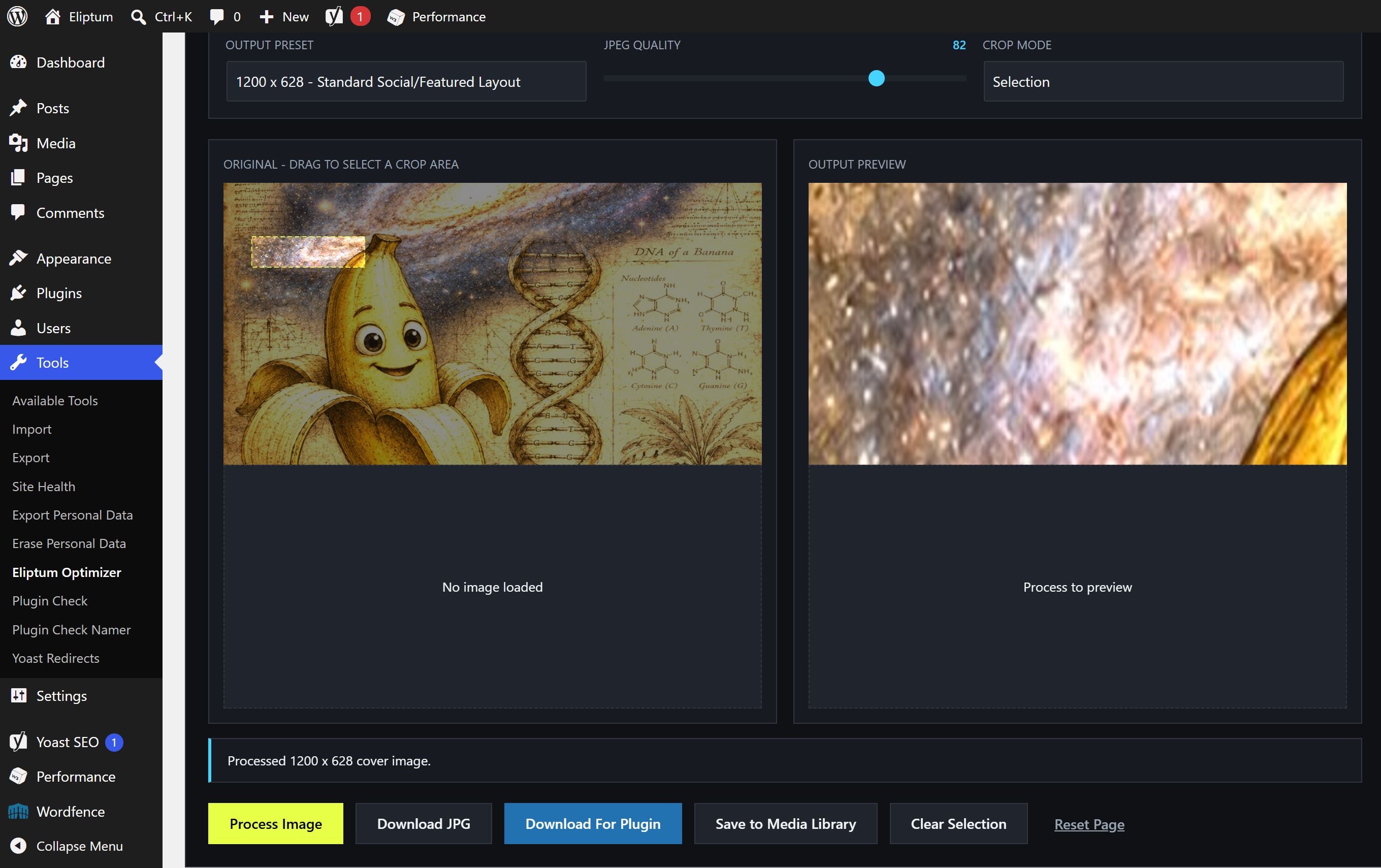
Eliptum Cover Image Optimizer introduces an asynchronous, sandboxed client-side processing workstation running completely within the userÌtumọ̀ Yorùbá: ’s local browser environment. By manipulating pixels strictly via HTML5 canvas operations, it completely isolates production web servers from standard memory-intensive image handling overhead.
Users can safely load local resources via drag-and-drop mechanics, execute real-time relative crops, target dedicated layout viewport presets (1200×628, 1600×900, 1920×1080, 800×450), and save results locally or directly into the native WordPress Media Library.
The utility features complex lightweight filtering math including granular levels (black/white points), gamma distribution modifications, contrast adjustment matrices, pixel saturation alterations, channel-specific balances, high-pass sharpening kernels, and gray/heat/cyan/gold color mappings.
This workspace is also highly optimized for open-source project managers and creators. It functions as a complete asset generation kit for designing official WordPress plugin repository graphical banners and display icons. The built-in asset bundle automated process isolates, scales, center-crops, and delivers standard repository dimensions directly to your machine.
Features
- Fully isolated browser-based local engine processing via HTML Canvas APIs.
- One-click automated asset bundle production for generating official WordPress plugin repository assets (
banner-772x250.jpg,banner-1544x500.jpg,icon-128x128.png, andicon-256x256.png). - Automated crop boundaries featuring center, top, bottom, and smart center matrix fills.
- Secure optional cross-origin direct asset loading.
- Integrated dynamic save mechanics pipeline targeting the native WordPress Media Library without page reloads.
- Comprehensive structural image manipulations including advanced sharpening algorithms and custom channel transformations.
- No external tracking frameworks, tracking cookies, or remote script injections.
Àwọn àwòrán ìbòjú
Ìgbéwọlẹ̀
- Upload the
eliptum-cover-image-optimizerfolder structure to your/wp-content/plugins/directory. - Toggle activation within your WordPress Plugins admin window.
- Simply navigate through your admin dashboard and click on Tools -> Eliptum Optimizer to access the unified workbench workspace.
FAQ
-
Does this framework introduce memory leaks or heavy server loads?
-
No. Because execution parameters map directly onto local client-side hardware via canvas processing loops, your production web host encounters absolutely zero performance impact.
-
Why do certain direct remote URLs throw security alerts?
-
Browsers strictly enforce Cross-Origin Resource Sharing (CORS) specifications. Remote servers hosting files must explicitly supply permissive headers to allow deep browser pixel operations. Using the local drag-and-drop file uploader completely bypasses this browser rule.
Àwọn àgbéyẹ̀wò
Kò sí àwọn àgbéyẹ̀wò fún plugin yìí.
Àwọn Olùkópa & Olùgbéejáde
“Eliptum Cover Image Optimizer” jẹ́ ètò ìṣàmúlò orísun ṣíṣí sílẹ̀. Àwọn ènìyàn wọ̀nyí ti ṣe ìkópa sí plugin yìí.
Àwọn Olùkópa
Túmọ̀ “Eliptum Cover Image Optimizer” sí èdè rẹ.
Ṣe o nífẹ̀ẹ́ sí ìdàgbàsókè?
Ṣàwárí koodu, ṣàyẹ̀wò ibi ìpamọ́ SVN, tàbí ṣe àgbékalẹ̀ sí àkọsílẹ̀ ìdàgbàsókè nípasẹ̀ RSS.
Àkọsílẹ̀ àwọn àyípadà
1.1.3
- Added “Download For Plugin” single-action generator for official WordPress repository asset formats (banners and icons).
- Migrated plugin entry access point documentation to Tools -> Eliptum Optimizer.
1.1.2
- Complete namespace rebrand to resolve directory trademark conflicts.
- Enhanced technical category feature documentation.