Àpèjúwe
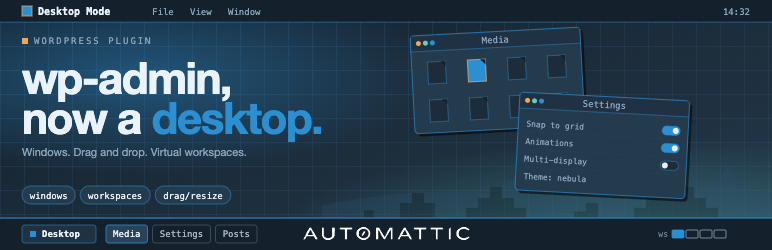
Desktop Mode renders /wp-admin as a desktop operating system. Admin screens open as draggable, resizable, minimizable windows on a desktop, with a left-edge dock built from the admin menu. The classic admin stays untouched for everyone else, and deactivating the plugin restores vanilla Core exactly.
Built and maintained by Automattic — the company behind WordPress.com, Jetpack, WooCommerce, and Tumblr. Zero Core patches: every feature is wired through public WordPress hooks.
Highlights
- Per-user opt-in. An admin-bar toggle flips a user-meta flag; nobody else sees any change.
- Window system. Iframe windows load admin pages chromelessly. Native windows render directly in the parent DOM via a public registration API. Both share drag, resize, minimize, maximize, fullscreen, and detach-to-new-tab.
- Dock + taskbar. Left-edge dock for core menus; bottom macOS-style pill taskbar for plugin menus. Letter-badge icon fallback for plugins without icon art.
- Virtual desktops (“Spaces”). Multiple desktops per user, each with its own window set. Overview grid surfaces the Spaces switcher and thumbnails.
- Arrange & snap. Cascade, Tile, Overview, Snap-to-grid. Plugins contribute custom entries.
- Wallpaper & widget registries. Server- and client-side registration. CSS presets plus canvas (WebGL/2D) wallpapers with collision-aware surface data for snow/rain/physics effects.
- Desktop icons. Wallpaper-layer shortcuts that open native windows or admin URLs.
- AI Copilot (optional). Cmd+K palette backed by an agentic loop with built-in search tools. Disabled until you supply an API key. See “External services” below.
- Slash commands & palettes. Public registration APIs for plugin authors.
- Cross-frame drag bridge. Media-library attachments drag across iframe boundaries.
- Session persistence. Window stack (including desktops, focus, state) restored across reloads.
- i18n. Full gettext coverage across PHP and TypeScript; Spanish translation shipped.
For plugin authors
Desktop Mode is built to be extended. Every significant behavior is hookable — add a desktop icon, register a dock item, gate desktop mode by role, react to window events, or register a native window, all from your own plugin with zero patches here.
Comprehensive PHP and JavaScript hook surface, plus stable desktop_mode_register_* functions for windows, widgets, wallpapers, icons, window tabs, commands, settings tabs, and AI tools. See the developer docs on GitHub.
External services
This pluginÌtumọ̀ Yorùbá: ’s optional AI Copilot sends data to OpenAI (https://api.openai.com/v1/responses) when, and only when, an administrator configures an OpenAI API key in Settings AI. With no key configured, no external requests are made.
When the AI Copilot is enabled and a user invokes it (via Cmd+K or the slash-command palette):
- What is sent: the userÌtumọ̀ Yorùbá: ’s prompt, the conversation history for the active session, the chosen model identifier (e.g.
gpt-4o-mini), and tool-call metadata. The pluginÌtumọ̀ Yorùbá: ’s built-in tools (search_posts,search_pages,search_comments) may include excerpts of the matching posts/pages/comments in tool results, which are then sent back to OpenAI as part of the agentic loop. - When it is sent: on user-initiated AI requests, and (if enabled) on
save_post, term-save, and comment-save hooks for auto-analysis. Auto-analysis runs server-side as part of the post-save flow. - Why it is sent: to obtain model completions and tool-call decisions that drive the AI Copilot.
- Who provides the service: OpenAI, L.L.C. — see the OpenAI Terms of Use and the OpenAI Privacy Policy.
The AI CopilotÌtumọ̀ Yorùbá: ’s provider layer is also extensible: third-party plugins may register additional providers via desktop_mode_register_ai_provider(). Those providers may send data to other endpoints; review each pluginÌtumọ̀ Yorùbá: ’s own privacy disclosure separately.
No other external services are contacted by this plugin.
Credits
Desktop Mode is brought to you by Automattic. The plugin is open source under GPLv2-or-later; contributions are welcome on GitHub.
Third-party libraries
The plugin bundles the following third-party JavaScript library, loaded on demand only when a feature that needs it is in use:
- PixiJS (MIT License) — used by the interactive OS Settings About scene, the Content Graph window, and built-in canvas wallpapers (e.g. the animated WordPress logo). PixiJS is loaded from the pluginÌtumọ̀ Yorùbá: ’s own
assets/vendor/directory; no CDN requests are made.
Ìgbéwọlẹ̀
- Upload the plugin folder to
/wp-content/plugins/, or install via Plugins Add New Upload Plugin. - Activate the plugin through the Plugins screen in WordPress.
- Click the desktop icon in the admin barÌtumọ̀ Yorùbá: ’s top-right corner. The admin reloads inside the desktop shell.
- Click the same icon again at any time to return to the classic admin.
Optional: enable the AI Copilot
- Open Settings AI inside desktop mode.
- Paste an OpenAI API key and pick a model.
- Press Cmd+K (or Ctrl+K) anywhere in desktop mode to open the AI palette.
FAQ
-
Does this change anything for users who donÌtumọ̀ Yorùbá: ’t opt in?
-
No. The classic admin is untouched until a user toggles desktop mode on for themselves. Deactivating the plugin restores vanilla Core exactly.
-
Does the plugin require an external service to function?
-
No. The desktop shell, windowing, dock, taskbar, virtual desktops, widgets, wallpapers, and all extension APIs work entirely on-site. The AI Copilot is the only feature that contacts an external service, and it is disabled until an administrator configures an API key. See “External services” in the description.
-
Does it patch WordPress core?
-
No. Every feature is wired through public WordPress actions and filters.
-
How do I disable desktop mode for my user?
-
Click the desktop icon in the admin bar a second time to flip the toggle off. The plugin can also be deactivated globally from the Plugins screen.
-
Where is the developer documentation?
-
In
docs/inside the plugin, and on GitHub. The hook reference, JavaScript reference, bridge protocol, and copy-paste examples all live there.
Àwọn àgbéyẹ̀wò


Àwọn Olùkópa & Olùgbéejáde
“Desktop Mode” jẹ́ ètò ìṣàmúlò orísun ṣíṣí sílẹ̀. Àwọn ènìyàn wọ̀nyí ti ṣe ìkópa sí plugin yìí.
Àwọn Olùkópa


A ti túmọ̀ “Desktop Mode” sí èdè agbègbè 1 kan. Ọpẹ́lọpẹ́ fún àwọn atúmọ̀ èdè fún àwọn ìkópa wọn.
Túmọ̀ “Desktop Mode” sí èdè rẹ.
Ṣe o nífẹ̀ẹ́ sí ìdàgbàsókè?
Ṣàwárí koodu, ṣàyẹ̀wò ibi ìpamọ́ SVN, tàbí ṣe àgbékalẹ̀ sí àkọsílẹ̀ ìdàgbàsókè nípasẹ̀ RSS.
Àkọsílẹ̀ àwọn àyípadà
0.8.5
- Shared folders, heartbeat widget, and heartbeat-pipeline hardening
- Recycle Bin: show item type badges inline next to title
- Plugins window: expandable rows with rich plugin details
- Remember native window size across opens
- Fix blank plugin icons in the Plugins window
- Restore “Show desktop on wallpaper click” as an opt-in setting
- Fix plugin update refresh, dock badge, and stuck-row failures
- Trash bin polish: URL badge, live placement badge, no media auto-trash
- Throw on empty REST body to avoid TypeError after self-replace
- Hide Media filter tab when MEDIA_TRASH is off
- Sequence openCurrentPage after restoreSession to avoid duplicate windows
- Fix window refresh issue on new sessions
0.8.4
- Faster Desktop Mode, main bundle cut by 59 %
- “Edit Post” from the front-end admin bar opens nothing
- Cross-page admin-link clicks: state, destructive actions, referer hint
- Warn loudly when a
<wpd-*>tag is used without being imported - Support re-uploading existing plugins, add post-install Activate panel
- Restore the full WordPress command palette inside Cmd+K
0.8.3
- Feat comments as native windows
- Chrome <111 titlebars + duplicate-placement REST 500s
- SW navigation interception caused window-in-window after core update
- Open each post as its own window from the Posts window
- Fix Users window data + live-refresh, plus per-window REST clients
- Session-expiry cascade + Plugins window sync
- Narrow scope to /wp-admin/ and throttle SW reloads
- Plugins window: real updates, not just a phantom badge
- Support plain permalinks for REST URL construction
- Hide registered icons from desktop instead of trashing
0.8.2
- Many fixes and new features
- Add unit test to ensure bridge script skips core AJAX update buttons
- Native Plugins window +
<wpd-card> - Appearance window polish + dock-peek fixes
- Fix upload theme
- Implement favicon resolver and associated tests for desktop mode
- Auto-inject X-WP-Nonce for REST API requests
- Enhance user management functionality in WordPress REST API
- Fix user role updates
- Fix plugin native issues
- Enhance color scheme preview functionality by adding shell scheme flipping
- Fix rearrange icons out of desktop
- Open each post in its own window
- Add item visibility and dock order settings
- Add first-run welcome dialog for Desktop Mode
- Fix dock management
- Refetch desktop placements on Recycle Bin restore
0.8.1
- Framework rework and stability improvements — significant internals refactor, smoother window lifecycle, and more reliable bridging between iframe and native windows.
- Drag and drop reworked end-to-end: calmer pointer behavior, more accurate hit-testing, and reliable handoff across windows.
- Posts, Pages, and Users now open as native desktop windows — direct DOM rendering inside the shell instead of an iframe, faster open, instant interaction, and UI tailored to the windowing model.
- New Content Graph tool — an interactive map of how your content links together. Pan, zoom, and focus a node to explore its neighborhood.
- Cross-page admin link routing in the chromeless bridge so links across the admin stay inside the desktop shell.
- Many bug fixes across the admin bar, Fullscreen toggle, resize handles over iframes, real-time icon refresh on plugin activation, and the PWA shell.
0.5.1
- Code editor and framework improvements.
- Enhanced AI provider integration: third-party providers may register through
desktop_mode_register_ai_provider(). - Title-bar button registry with icon painting for plugin authors.
- OS Settings tabs are now extensible via
desktop_mode_register_settings_tab_script()/desktop_mode_register_settings_tab(). - AI Copilot extensibility: server-side tool registry (
desktop_mode_register_ai_tool()) and client-sidewp.desktop.ai.ask()programmatic entry point. - UI component kit expansion (~25
<wpd-*>web components). - Backtick hotkey to cycle window focus.
- Unified command palettes via the palette registry.
- OS Settings Help tab.
0.5.0
- Command registration APIs (
desktop_mode_register_command_script()/desktop_mode_register_command()) with live install/activate refresh. - Media-library enhancement enabled by default, with opt-out.
- Dock CSS selectors updated; overflow handling improved.
See the GitHub releases page for the full history.