
Àpèjúwe
Check your privilege and your tags.
When previewing a post, images with no alt text or caption will be highlighted red, and a warning will be shown.
Screen reader software relies on alt text to describe images for visually impaired users.
Àwọn àwòrán ìbòjú
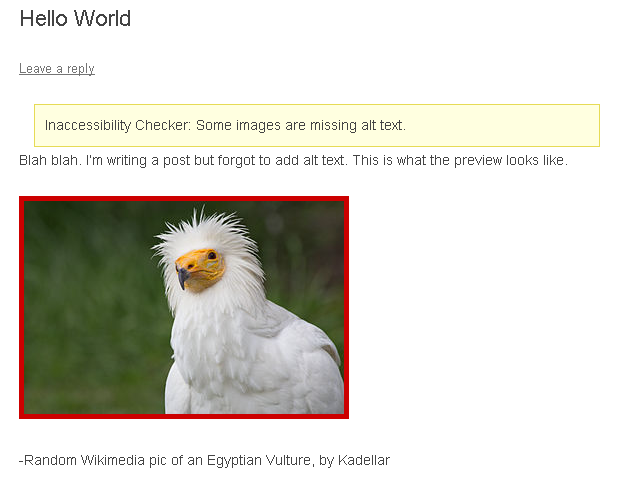
What a previewed post looks like.
Ìgbéwọlẹ̀
- Upload and extract
inaccessibility-checker.zipto the/wp-content/plugins/directory. - Activate the plugin through the ‘Plugins’ menu in WordPress.
Àwọn àgbéyẹ̀wò
Kò sí àwọn àgbéyẹ̀wò fún plugin yìí.
Àwọn Olùkópa & Olùgbéejáde
“Inaccessibility Checker” jẹ́ ètò ìṣàmúlò orísun ṣíṣí sílẹ̀. Àwọn ènìyàn wọ̀nyí ti ṣe ìkópa sí plugin yìí.
Àwọn Olùkópa
Túmọ̀ “Inaccessibility Checker” sí èdè rẹ.
Ṣe o nífẹ̀ẹ́ sí ìdàgbàsókè?
Ṣàwárí koodu, ṣàyẹ̀wò ibi ìpamọ́ SVN, tàbí ṣe àgbékalẹ̀ sí àkọsílẹ̀ ìdàgbàsókè nípasẹ̀ RSS.
Àkọsílẹ̀ àwọn àyípadà
0.0.3
- Replaced regex with DOM manipulation.
- Fixed exclusion when captioned (Sometime after WordPress 3.5.2, html structure changed div/p to figure/figcaption).
- Confirmed support for WordPress 4.7.
0.0.2
- Accepted captions when alt-text is absent.
- Formatted PHP to meet the WordPress coding standards.
0.0.1
- Initial release.