
Àpèjúwe
Hey there! 👋
Integrating Square with your site shouldnÌtumọ̀ Yorùbá: ’t be complicated. ThatÌtumọ̀ Yorùbá: ’s why we built MyPayKit Payment Forms for Square Ìtumọ̀ Yorùbá: – a powerful yet simple plugin that helps you collect Square payments smoothly.
WeÌtumọ̀ Yorùbá: ’ve seen firsthand how many small businesses struggle with clunky payment forms that frustrate customers and lead to abandoned carts. Our Square payment solution changes that!
🚨 Why Square payment forms matter for your business:
When customers have a seamless Square payment experience, theyÌtumọ̀ Yorùbá: ’re much more likely to complete their purchase. Professional payment forms build trust and increase conversion rates.
With MyPayKit Payment Forms for Square, you get:
* Secure Square payment processing that customers recognize and trust
* A user-friendly form builder that helps you create great-looking payment forms quickly
* Simple Square integration without technical headaches
* Support for multiple payment methods including credit cards and digital wallets
💎 What makes MyPayKit different:
- 🔄 Simple Square Integration Ìtumọ̀ Yorùbá: – Connect your Square account in seconds and start accepting payments right away
- 📝 Conversion-Optimized Payment Forms Ìtumọ̀ Yorùbá: – Templates designed to increase conversions and guide customers smoothly through checkout
- 📱 Fully Responsive Forms Ìtumọ̀ Yorùbá: – Square payment forms look great and function perfectly on phones, tablets, and desktops
- 🔒 Enterprise-Grade Security Ìtumọ̀ Yorùbá: – Keep your customers’ payment information safe with SquareÌtumọ̀ Yorùbá: ’s secure processing
- ⚡ 5-Minute Setup Ìtumọ̀ Yorùbá: – Get your Square integration up and running in minutes, even if youÌtumọ̀ Yorùbá: ’re not tech-savvy
- 🧩 Block Editor Integration Ìtumọ̀ Yorùbá: – Add Square payment forms anywhere on your site with no coding required
- 💵 Multiple Payment Options Ìtumọ̀ Yorùbá: – Accept credit cards, digital wallets, and more through SquareÌtumọ̀ Yorùbá: ’s payment system
Start accepting Square payments today with MyPayKit Payment Forms for Square!
When to use MyPayKit Square Payment Forms
- ✓ Online Stores Ìtumọ̀ Yorùbá: – Sell products and services with professional Square payment forms
- ✓ Donation Collections Ìtumọ̀ Yorùbá: – Create donation forms that process payments through Square
- ✓ Service Bookings Ìtumọ̀ Yorùbá: – Accept deposits and payments for appointments and services
- ✓ Event Registrations Ìtumọ̀ Yorùbá: – Sell tickets and collect registrations with Square integration
- ✓ Membership Sites Ìtumọ̀ Yorùbá: – Process Square payments for membership access
Requirements
- PHP 7.4 or higher
- MyPayKit account (free to create)
- Square account
External services
This plugin connects to the MyPayKit API (https://mypaykit.com/api/v1) to manage payment forms and process Square payments. Here is a detailed breakdown of the external service usage:
MyPayKit API
- What it is: A service that manages Square payment forms and facilitates payment processing.
-
When data is sent:
- When connecting your site to your MyPayKit account via OAuth
- When fetching your available payment forms for display in the admin
- When creating, editing, or deleting payment forms
- When rendering payment forms on your website (through embedded iframes)
-
What data is sent:
- Site authentication tokens (site_token and mypaykit_token) for secure API communication
- Form IDs when requesting specific form data
- Admin email address during initial account connection (only with user consent)
- Website visitor data is sent directly to MyPayKit via the embedded iframe when they view or submit a payment form
-
Who provides this service: SeedProd, LLC (“MyPayKit”)
- Legal information: Terms of Use, Privacy Policy
Square Payment Processing
- What it is: Payment processing services accessed through MyPayKit.
- When/how itÌtumọ̀ Yorùbá: ’s used: When website visitors submit payment information through the embedded MyPayKit form. Payment data is sent directly from the visitorÌtumọ̀ Yorùbá: ’s browser to Square via the MyPayKit form iframe Ìtumọ̀ Yorùbá: – your site never receives or processes the payment information.
- Legal information: Square Terms of Service, Square Privacy Policy
Support
For support, please visit mypaykit.com/support
Àwọn àwòrán ìbòjú
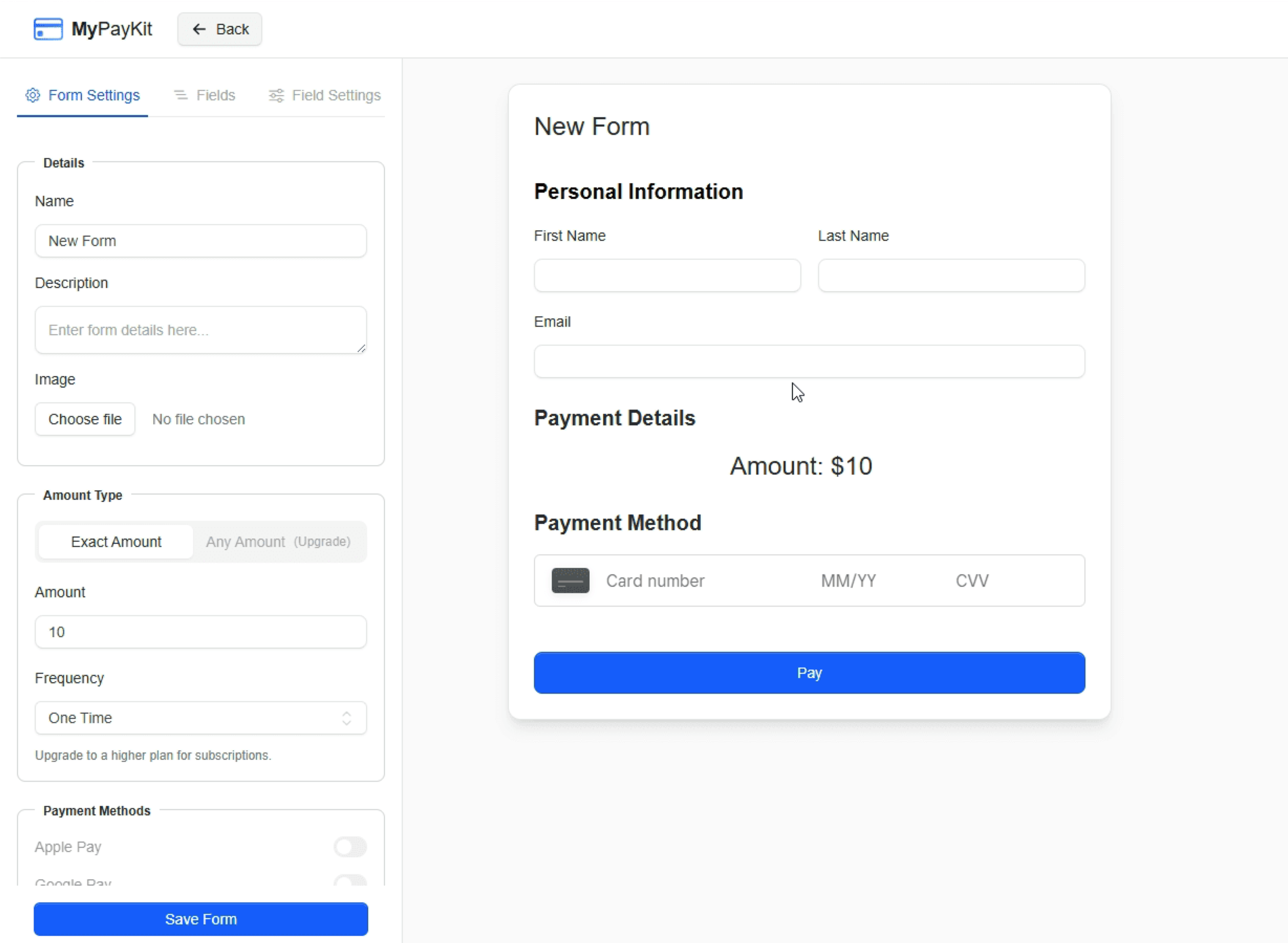
MyPayKit Forms admin interface
Àwọn ìdí
Plugin yìí pèsè 1 ìdí.
- MyPayKit Form
Ìgbéwọlẹ̀
- Upload the plugin files to the
/wp-content/plugins/directory, or install the plugin through the WordPress plugins screen. - Activate the plugin through the ‘Plugins’ screen in WordPress.
- Go to ‘MyPayKit’ in your admin menu.
- Click ‘Connect MyPayKit Account’ to link your account.
- Start creating and embedding payment forms!
FAQ
-
How do I integrate Square with my site?
-
MyPayKit makes Square integration simple:
1. Install and activate MyPayKit Payment Forms for Square
2. Connect your Square account with our OAuth integration
3. Create your first payment form
4. Add the form to any page using our block or shortcode -
Do I need a MyPayKit account?
-
Yes, you need a MyPayKit account to use this plugin. You can create one for free at mypaykit.com.
-
Do I need a Square account?
-
Yes, since MyPayKit uses Square for payment processing, youÌtumọ̀ Yorùbá: ’ll need a Square account connected to your MyPayKit account.
-
How do I add a Square payment form to my page?
-
You can add Square payment forms using either:
1. The MyPayKit Forms block in the block editor
2. The [mypaykit_form id=”form_id”] shortcode in the classic editor -
Is Square payment processing secure?
-
Yes! All payment processing is handled securely through SquareÌtumọ̀ Yorùbá: ’s payment infrastructure with PCI compliance. Your site never directly handles sensitive payment data.
-
What payment methods can I accept with MyPayKit Square integration?
-
MyPayKit allows you to accept all payment methods supported by Square, including credit cards, debit cards, and digital wallets like Apple Pay and Google Pay.
-
Can I customize how my Square payment forms look?
-
Yes! MyPayKit offers extensive customization options for your payment forms, allowing you to match your brand colors and style.
Àwọn àgbéyẹ̀wò

Àwọn Olùkópa & Olùgbéejáde
“MyPayKit Ìtumọ̀ Yorùbá: – Payment Forms for Square” jẹ́ ètò ìṣàmúlò orísun ṣíṣí sílẹ̀. Àwọn ènìyàn wọ̀nyí ti ṣe ìkópa sí plugin yìí.
Àwọn Olùkópa

Túmọ̀ “MyPayKit Ìtumọ̀ Yorùbá: – Payment Forms for Square” sí èdè rẹ.
Ṣe o nífẹ̀ẹ́ sí ìdàgbàsókè?
Ṣàwárí koodu, ṣàyẹ̀wò ibi ìpamọ́ SVN, tàbí ṣe àgbékalẹ̀ sí àkọsílẹ̀ ìdàgbàsókè nípasẹ̀ RSS.
Àkọsílẹ̀ àwọn àyípadà
1.0.8
- Added ability to disconnect site from MyPayKit.
- Added uninstall cleanup for connection tokens and transients.
- Added deactivation hook to clear transient caches.
- Improved security for disconnect action with ownership verification.
1.0.7
- Improved overall security.
1.0.6
- Added ownership verification for multi-admin WordPress sites.
- Improved security for site reconnection flow.
- Added caching for ownership checks to improve performance.
1.0.5
- Fixed issue with Settings page redirect.
1.0.4
- Improved Square connection status monitoring.
- Improved error handling.
1.0.3
- Improved iframe compatibility across different browsers.
1.0.2
- Fixed issue with iframes.
1.0.1
- Fixed an issue with redirects when the plugin was activated
1.0.0
- Initial release