

Àpèjúwe
WordPress Email Templates Designer is a useful tool for creating and customizing WordPress emails if the default WordPress email template appears plain to you and you want to customize them, this is what you need. With no coding knowledge required, you can easily drag and drop, edit, and customize the layouts/contents within the email templates. Try our plugin to make the template look friendly and match your store design, and easily customize WordPress emails sent to customers.
Preview 9MAIL Ìtumọ̀ Yorùbá: – WordPress Email Templates Designer
How to install and use the plugin
Features of WordPress Email Templates Designer
-
Drag-and-drop builder: The easy-to-use email template builder allows you to create professional and eye-catching WordPress email templates.
-
Layout: Layouts can be added quickly by dragging and dropping appropriate layouts, available from 1 -4 columns.
-
Elements:All elements you need to build a complete WordPress email are provided with full customization options for their appearance.
-
Unlimited Number of Rows: Unlimited rows can be added to the email template and include everything you need in the emails.
-
Direction: Based on your current language, make the email display from right to left, or left to right accordingly.
-
Live Preview of Changes: Visually observe emails by the preview, update any changes in the preview mode, and integrate to see on the desktop, and mobile.
-
Send Test Emails: Check the email design before the real sending.
-
Display Dynamic Data with Placeholders: Displaying placeholders makes it easy to design templates. Placeholders such as admin email, site name, site url, current year while sending the WordPress emails.
-
Import/Export email templates in just a few taps – Reduce your workload.
-
Build your template in no time with shortcodes.
-
Responsive and works perfectly on any device.
Elements in WordPress Email Templates Designer
-
Text: Add text content to the template and customize the font color, font size, alignment, border width, insert/edit link, insert/edit image, shortcode, info icon, social icon, border style, border color, background color, text padding, and text margin.
-
Divider: Add a single line divider to the template and choose a style for the divider.Customize the divider’s style, width, height, color, alignment, margin, and padding.
-
Socials: Add social icons to the email template, enter your ULRs in the placeholder including Facebook, X , Instagram, Youtube, Linkedin.
-
Image: Add an image to the email template and adjust its size and alignment, border style, border color, background color, text padding, and text margin.
-
Button: Add and customize the button: Name, the link of a button, style the border, alignment, background and padding.
-
Menu bar: Add and customize the menu bar or name the navigation bar that includes links to the most important sections of the site: Home, Shop, Contact…
-
Contact: Display contact information with icons on the email template.
-
Spacer: Add a space between other elements and customize its height, borders with style and color, and the background color.
Pro version
-
All free version features
-
Turn off Notify user signup to admin, Notify userÌtumọ̀ Yorùbá: ’s password change to admin, Notify moderator new comment to admin
-
More socials: Facebook, X, Instagram, Youtube, Linkedin, Whatsapp, Telegram, Tiktok, and Printest.
-
Create customizable blocks and add them to any template
-
Add your suggested block posts of any categories you select to the email template.
-
The responsive point helps to display the template as designed on any device
-
Send emails with files attached
-
Set rules to apply to each template.
MAY BE YOU NEED
9Map Ìtumọ̀ Yorùbá: – Map Multi Locations
Abandoned Cart Recovery for WooCommerce
Advanced Product Information for WooCommerce
AFFI Ìtumọ̀ Yorùbá: – Affiliate Marketing for WooCommerce
ALD Ìtumọ̀ Yorùbá: – Dropshipping and Fulfillment for AliExpress and WooCommerce
Bopo Ìtumọ̀ Yorùbá: – WooCommerce Product Bundle Builder
Bulky Ìtumọ̀ Yorùbá: – Bulk Edit Products for WooCommerce
Cart All In One For WooCommerce
Catna Ìtumọ̀ Yorùbá: – Woo Name Your Price and Offers
Checkout Upsell Funnel for WooCommerce
ChinaDS – Tmall-Taobao Dropshipping for WooCommerce
Clear Autoptimize Cache Automatically
COMPE Ìtumọ̀ Yorùbá: – WooCommerce Compare Products
Coreem Ìtumọ̀ Yorùbá: – Coupon Reminder for WooCommerce
CURCY Ìtumọ̀ Yorùbá: – Multi Currency for WooCommerce Ìtumọ̀ Yorùbá: – Smoothly on WooCommerce 9.x
Customer Coupons for WooCommerce
DEPART Ìtumọ̀ Yorùbá: – Deposit and Part payment for Woo
Email Template Customizer for WooCommerce
EPOI Ìtumọ̀ Yorùbá: – WP Points and Rewards
EPOW Ìtumọ̀ Yorùbá: – Custom Product Options for WooCommerce
EXMAGE Ìtumọ̀ Yorùbá: – WordPress Image Links
Faview Ìtumọ̀ Yorùbá: – Virtual Reviews for WooCommerce
FEWC Ìtumọ̀ Yorùbá: – Extra Checkout Fields For WooCommerce
Free Shipping Bar for WooCommerce
GIFT4U Ìtumọ̀ Yorùbá: – Gift Cards All in One for Woo
HANDMADE Ìtumọ̀ Yorùbá: – Dropshipping for Etsy and WooCommerce
HAPPY Ìtumọ̀ Yorùbá: – Helpdesk Support Ticket System
Jagif Ìtumọ̀ Yorùbá: – WooCommerce Free Gift
LookBook for WooCommerce Ìtumọ̀ Yorùbá: – Shoppable with Product Tags
Lucky Wheel for WooCommerce Ìtumọ̀ Yorùbá: – Spin a Sale
Orders Tracking for WooCommerce
Pofily Ìtumọ̀ Yorùbá: – WooCommerce Product Filters
PRENA Ìtumọ̀ Yorùbá: – Product Pre-Orders for WooCommerce
Product Builder for WooCommerce Ìtumọ̀ Yorùbá: – Custom PC Builder
Product Size Chart For WooCommerce
Product Variations Swatches for WooCommerce
REDIS Ìtumọ̀ Yorùbá: – WooCommerce Dynamic Pricing and Discounts
REES Ìtumọ̀ Yorùbá: – Real Estate for Woo
S2W Ìtumọ̀ Yorùbá: – Import Shopify to WooCommerce
SUBRE – Product Subscription for WooCommerce Ìtumọ̀ Yorùbá: – Recurring Payments
Suggestion Engine for WooCommerce
Thank You Page Customizer for WooCommerce Ìtumọ̀ Yorùbá: – Increase Your Sales
TMDS Ìtumọ̀ Yorùbá: – Dropshipping for TEMU and Woo
VARGAL Ìtumọ̀ Yorùbá: – Additional Variation Gallery for WooCommerce
VIMA Ìtumọ̀ Yorùbá: – Multi Customer Addresses for Woo
VISeek Ìtumọ̀ Yorùbá: – Easy Custom Search
W2S Ìtumọ̀ Yorùbá: – Migrate WooCommerce to Shopify
WebPOS – Point of Sale for WooCommerce
WPBulky Ìtumọ̀ Yorùbá: – WordPress Bulk Edit Post Types
Documentation
Plugin Links
Àwọn àwòrán ìbòjú
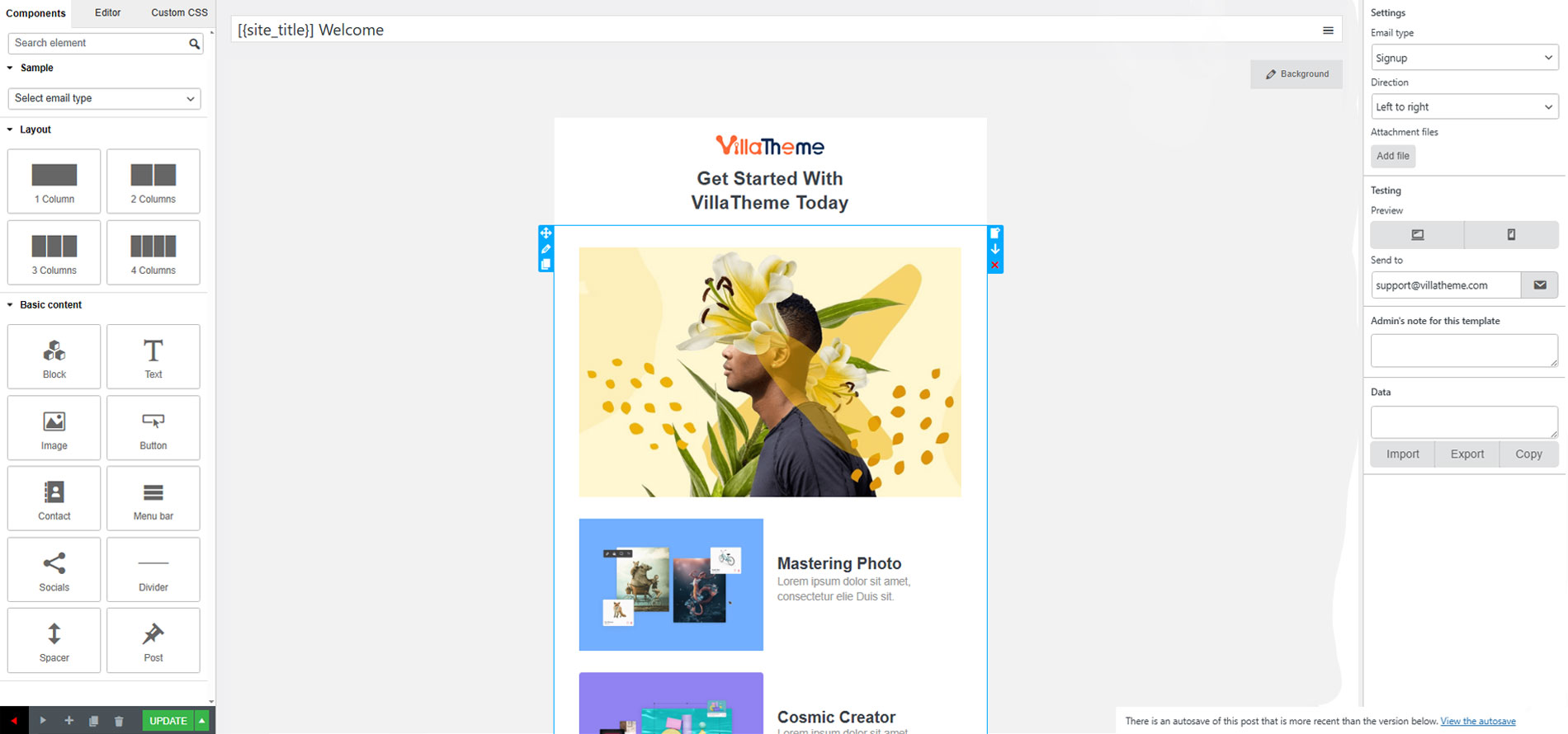
Edit template
Ìgbéwọlẹ̀
- Unzip the download package
- Upload
9mail-wp-email-templates-designerto the/wp-content/plugins/directory - Activate the plugin through the ‘Plugins’ menu in WordPress
Àwọn àgbéyẹ̀wò


Àwọn Olùkópa & Olùgbéejáde
“9MAIL Ìtumọ̀ Yorùbá: – WordPress Email Templates Designer” jẹ́ ètò ìṣàmúlò orísun ṣíṣí sílẹ̀. Àwọn ènìyàn wọ̀nyí ti ṣe ìkópa sí plugin yìí.
Àwọn Olùkópa

A ti túmọ̀ “9MAIL Ìtumọ̀ Yorùbá: – WordPress Email Templates Designer” sí àwọn èdè agbègbè 2. Ọpẹ́lọpẹ́ fún àwọn atúmọ̀ èdè fún àwọn ìkópa wọn.
Túmọ̀ “9MAIL Ìtumọ̀ Yorùbá: – WordPress Email Templates Designer” sí èdè rẹ.
Ṣe o nífẹ̀ẹ́ sí ìdàgbàsókè?
Ṣàwárí koodu, ṣàyẹ̀wò ibi ìpamọ́ SVN, tàbí ṣe àgbékalẹ̀ sí àkọsílẹ̀ ìdàgbàsókè nípasẹ̀ RSS.
Àkọsílẹ̀ àwọn àyípadà
/1.1.0 Ìtumọ̀ Yorùbá: – 2026.03.27/
Ìtumọ̀ Yorùbá: – Updated: Optimize code
/1.0.21 Ìtumọ̀ Yorùbá: – 2026.01.23/
Ìtumọ̀ Yorùbá: – Updated: VillaTheme support
/1.0.20 Ìtumọ̀ Yorùbá: – 2025.11.22/
Ìtumọ̀ Yorùbá: – Updated: VillaTheme support
Ìtumọ̀ Yorùbá: – Update: Make the default template compatible with the emails of Solid Security – Password, Two-Factor Authentication, and Brute Force Protection by StellarWP.
/1.0.19 Ìtumọ̀ Yorùbá: – 2025.07.24/
Ìtumọ̀ Yorùbá: – Updated: VillaTheme support
/1.0.18 Ìtumọ̀ Yorùbá: – 2025.06.02/
Ìtumọ̀ Yorùbá: – Fixed: Custom CSS only works on the mail test
/1.0.17 Ìtumọ̀ Yorùbá: – 2025.02.21/
Ìtumọ̀ Yorùbá: – Updated: VillaTheme support
/1.0.16 Ìtumọ̀ Yorùbá: – 2025.01.10/
Ìtumọ̀ Yorùbá: – Updated: VillaTheme support
/1.0.15 Ìtumọ̀ Yorùbá: – 2024.11.22/
Ìtumọ̀ Yorùbá: – Add: Filter: emtmpl_render_html_recover_content_auto_break_line
Ìtumọ̀ Yorùbá: – Update: Compatible with WP 6.7
/1.0.14 Ìtumọ̀ Yorùbá: – 2024.10.18/
Ìtumọ̀ Yorùbá: – Updated: Change shortcode {{ignore_9mail}} to ignore_9mail
– Updated: Update support class
/1.0.13 Ìtumọ̀ Yorùbá: – 2024.04.17/
Ìtumọ̀ Yorùbá: – Update: Compatible with WordPress 6.5
Ìtumọ̀ Yorùbá: – Update: Support file
/1.0.12 Ìtumọ̀ Yorùbá: – 2023.04.15/
Ìtumọ̀ Yorùbá: – Fix: Custom CSS
/1.0.11 Ìtumọ̀ Yorùbá: – 2023.04.12/
Ìtumọ̀ Yorùbá: – Fix: Button text color
/1.0.10 Ìtumọ̀ Yorùbá: – 2023.02.22/
Ìtumọ̀ Yorùbá: – Fix: Fix some string text domain
/1.0.9 Ìtumọ̀ Yorùbá: – 2022.08.31/
Ìtumọ̀ Yorùbá: – Fix: Check pro version exist
/1.0.8 Ìtumọ̀ Yorùbá: – 2022.08.18/
Ìtumọ̀ Yorùbá: – Update: Change namespace
Ìtumọ̀ Yorùbá: – Update: Premium version URL
/1.0.7 Ìtumọ̀ Yorùbá: – 2022.07.02/
Ìtumọ̀ Yorùbá: – Fix: Save Hebrew characters
/1.0.6 Ìtumọ̀ Yorùbá: – 2022.06.07/
Ìtumọ̀ Yorùbá: – Update: Compatible with WordPress 6.0
/1.0.5 Ìtumọ̀ Yorùbá: – 2022.04.21/
Ìtumọ̀ Yorùbá: – Fix: Text color in dark mode
/1.0.4 Ìtumọ̀ Yorùbá: – 2022.04.18/
Ìtumọ̀ Yorùbá: – Fix: Exclude WooCommerce HTML email
/1.0.3 Ìtumọ̀ Yorùbá: – 2022.04.15/
Ìtumọ̀ Yorùbá: – Fix: Link of menu bar
/1.0.2 Ìtumọ̀ Yorùbá: – 2022.04.08/
Ìtumọ̀ Yorùbá: – Update: Zoho mail layout
/1.0.1 Ìtumọ̀ Yorùbá: – 2022.04.04/
Ìtumọ̀ Yorùbá: – Update: Delete element, row by press keyboard
/1.0.0 Ìtumọ̀ Yorùbá: – 2022.04.01/
~ The first released.