
Àpèjúwe
Record, edit and publish audio directly from your WordPress site.
No external tools, no complex software — everything happens inside WordPress.
🎯 Use cases
Audio Editor & Recorder is designed for real-world use cases across many industries:
- Teachers can collect oral assignments, language exercises or student recordings directly on their website
- Musicians can quickly record ideas, demos or share audio sketches
- Podcasters and journalists can capture interviews or voice notes without external tools
- Customer support teams can collect voice messages instead of written forms
- Content creators can enrich their posts with audio content, stories or narration
Whether you need a simple voice recorder or a lightweight audio editor, this plugin helps you centralize everything inside WordPress.
🎙️ Record or upload audio
- Record audio directly from the browser (microphone)
- Upload existing audio files (voice, music, podcasts, sounds)
- Works on desktop and mobile
✂️ Edit audio visually
- Waveform-based editor
- Cut, copy, paste, crop, delete
- Select and modify specific parts of your audio
- Add multiple audio segments
📦 Save & manage audio in WordPress
- Save recordings as a custom “Audio” post type
- Automatically available in your Media Library
- Reuse your audio anywhere on your site
🔗 Display & use audio anywhere
- Insert audio into your content
- Display all audios with shortcode: [audio-editor-list]
- Personal user audio list: [audio-my-list] (page: /my-audios/)
- Frontend editor for users: [audio-editor]
⚡ Flexible shortcodes
- Compact version: [audio-editor mini=”true”]
- Customize button labels
- Show or hide specific controls via attributes
⚙️ Easy configuration
Find all settings under:
Settings Audio Editor
⏱️ Free version limitations
- Maximum recording duration: 5 minutes
- Maximum total audio length: 5 minutes
Try the live demo of the audio editor directly from your browser.
Free vs Pro
Free (Lite) version
- Record and upload audio
- Edit audio (cut, copy, paste, crop)
- Frontend editor with [audio-editor]
- Mini recorder available
- Maximum recording duration: 5 minutes
Pro version
- Unlimited recording duration
- Download audio as MP3
- Guest (non-logged-in) submissions
- Edit existing audio recordings
- 7 design templates + full color customization
- Redirect users after submission
🚀 Upgrade to Pro
Unlock advanced features and remove all limitations with Audio Editor Pro.
Upgrade to Audio Editor Pro to unlock all features.
💬 Feedback
More info on our website
Please donÌtumọ̀ Yorùbá: ’t hesitate to leave us suggestions for future release.
Have an idea or suggestion?
We’d love to hear from you to improve future versions.
Àwọn àwòrán ìbòjú
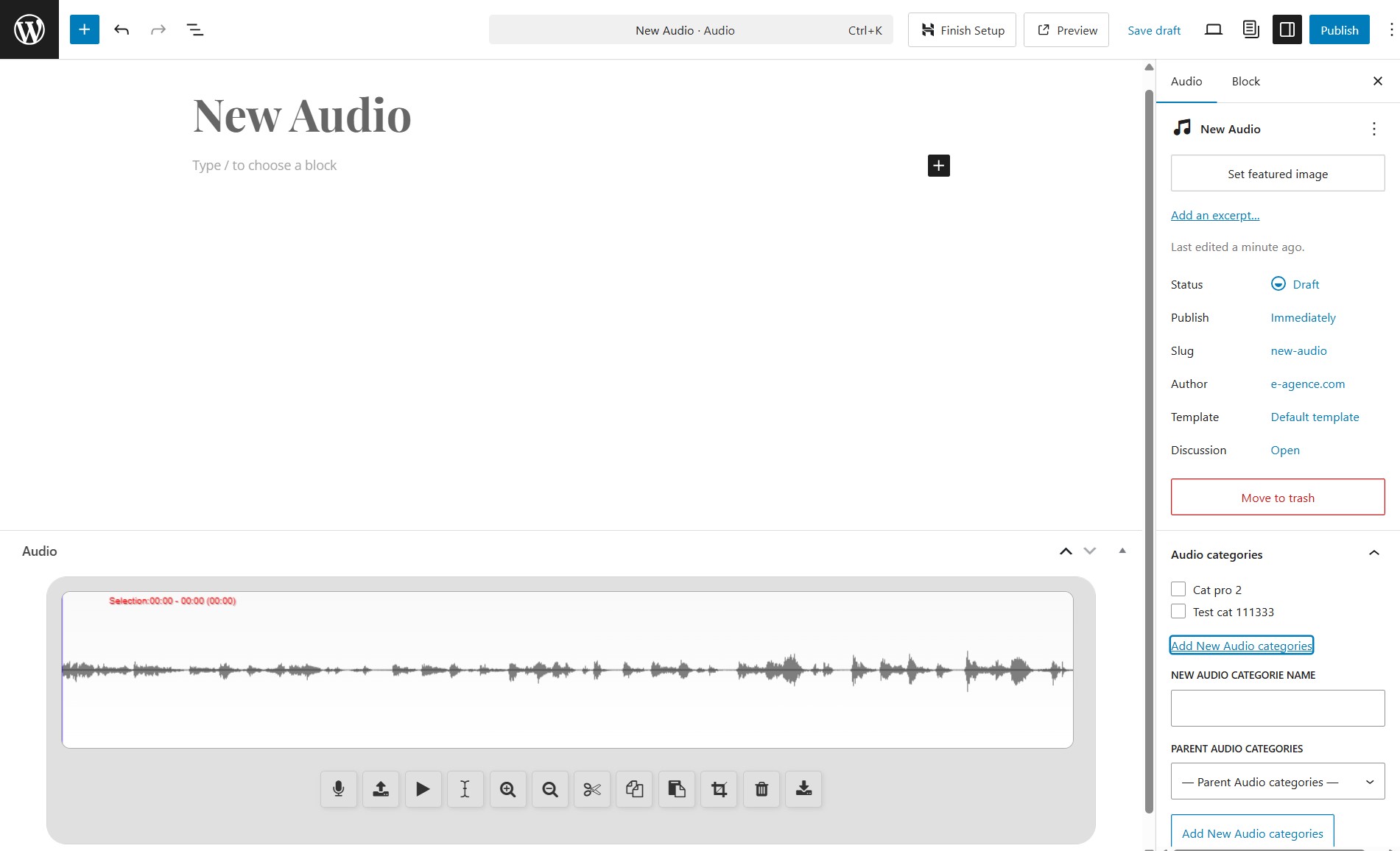
Backend audio editor inside the admin

Audios in the media library

Add audios into WordPress Editor using the Audio Block

Add audios in other editors like Divi visual builder
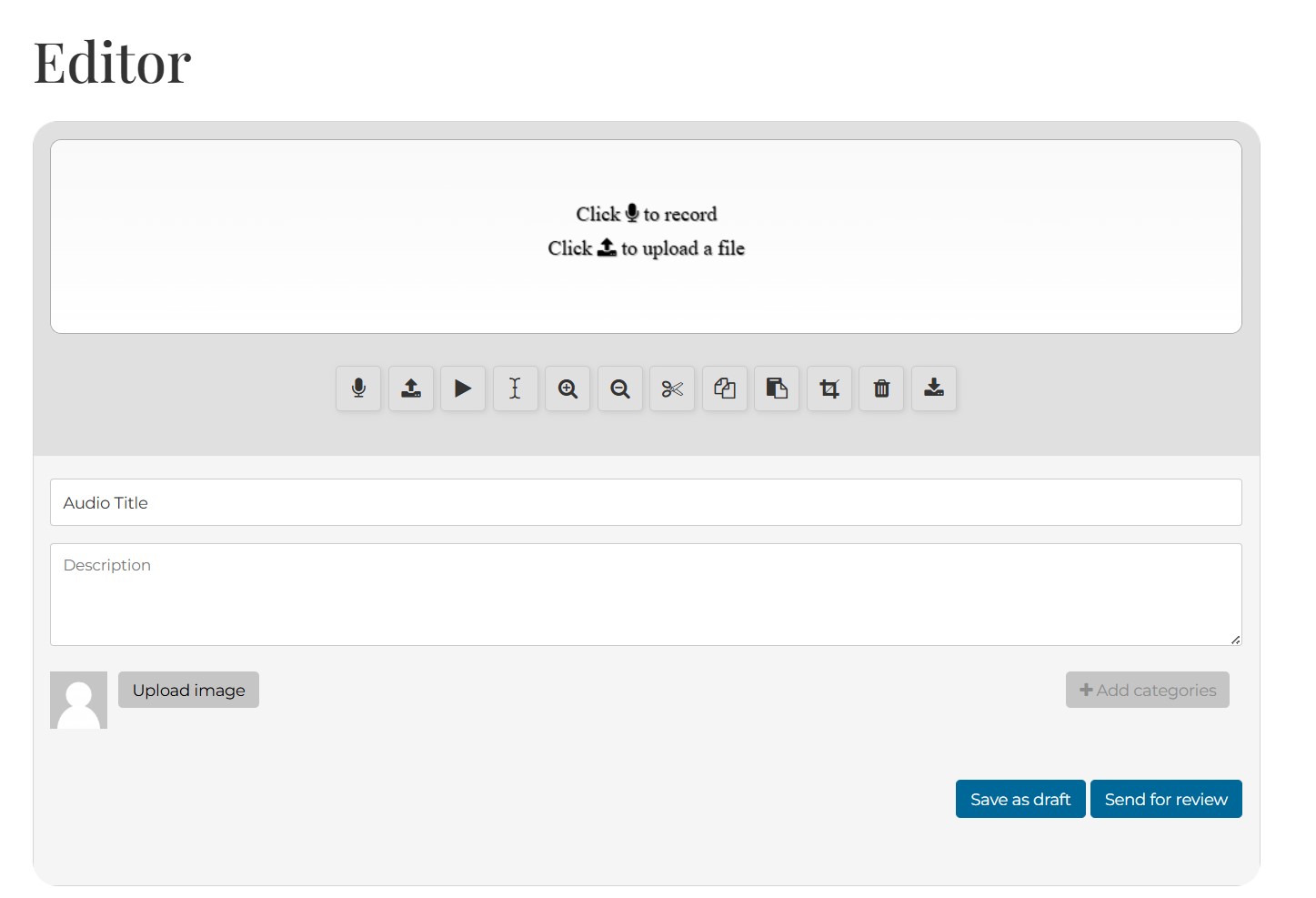
Frontend audio editor in the Twenty Twenty WP theme

Frontend mini audio recorder / uploader
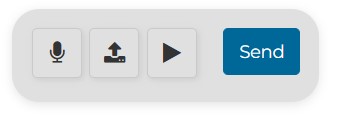
Frontend even more mini audio recorder using the hide-* shortcode attributes

Frontend My audios list page or using the [audio-my-list] shortcode

Audio single page
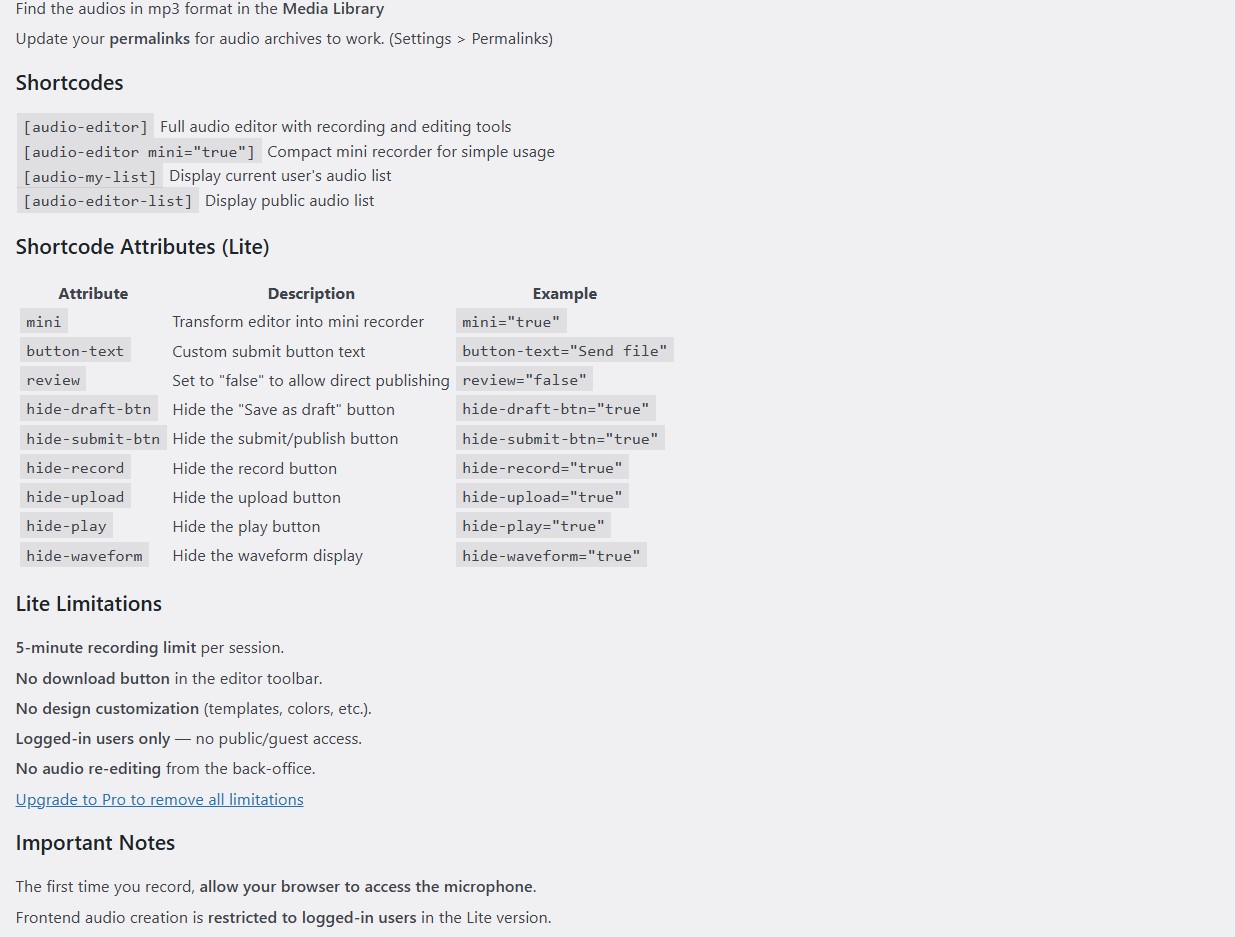
Settings and instructions page (under Settings Audio Editor)

Audio posts admin list
Ìgbéwọlẹ̀
From your WordPress dashboard
-
Visit Plugins > Add New
-
Search for “Audio Editor & Recorder”
-
Install and activate Audio Editor & Recorder from your Plugins page
-
Update your permalinks to make sure the audio posts are working
-
Click on the new menu items “Audios” and create your first audio!
-
Click on Settings Audio Editor for instructions and settings
FAQ
-
Can users record audio from the frontend?
-
Yes, using the shortcode [audio-editor].
-
Can I upload my own audio files?
-
Yes, you can upload and edit existing audio files.
-
Where are audios stored?
-
Audios are saved as a custom post type and in the WordPress Media Library.
-
Is there a recording limit?
-
Yes, the free version is limited to 5 minutes per recording.
-
Shortcodes
-
Ìtumọ̀ Yorùbá: – Frontend Editor: [audio-editor] (Editor page is automatically created, or insert it anywhere you want)
Ìtumọ̀ Yorùbá: – Customize your editor with the parameters:mini: transform the editor into a mini recorder for simple usage ([audio-editor mini=”true”])
color: change icons color (e.g.: color=”red”)
button-text: change the Submit button label (e.g.: button-text=”Send file”)
hide-record: set to 1 to hide the record button
hide-upload: set to 1 to hide the upload button
hide-play: set to 1 to hide the play button
hide-waveform: set to 1 to hide the waveform area
hide-draft-btn: set to 1 to hide the Save as Draft button
hide-submit-btn: set to 1 to hide the Submit button
For example, a mini recorder with only play and send button:
[audio-editor mini=”true” hide-upload=”1Ìtumọ̀ Yorùbá: ″ button-text=”SEND” color=”#336699Ìtumọ̀ Yorùbá: ″]Ìtumọ̀ Yorùbá: – Frontend audios private author list: [audio-my-list] (My audios page is automatically created)
Ìtumọ̀ Yorùbá: – Frontend audios public list: [audio-editor-list] (Insert anywhere you want) -
IMPORTANT
-
- The first time you record, you must allow your website to access the microphone when your browser prompts you.
- After creating from the frontend editor, you are redirected to the audio list page and you can re-edit audios from there.
- Frontend audio creation and edition are restricted to logged-in users. Guest access is available in Audio Editor Pro.
- The Audio Editor settings page is located under Settings Audio Editor in your WordPress dashboard.
- Recording and total audio duration are limited to 5 minutes. Upgrade to Pro to remove this limit.
-
Upgrade to Pro
-
Audio Editor Pro adds:
Ìtumọ̀ Yorùbá: – No recording or duration limit (5 min in free version)
Ìtumọ̀ Yorùbá: – Guest / logged-out user audio submission
Ìtumọ̀ Yorùbá: – 7 visual templates + full color customization (toolbar, buttons, waveform, form)
Ìtumọ̀ Yorùbá: – Shortcode design attributes: template, toolbar-bg, icon-color, btn-radius, form-bg, and 20+ more
Ìtumọ̀ Yorùbá: – [user-audio-edit] shortcode to re-edit existing audio posts
Ìtumọ̀ Yorùbá: – Download button for end users
Ìtumọ̀ Yorùbá: – Live admin preview panel -
Upgrading from v2.x?
-
Version 3 introduces a free Lite edition alongside the Pro version. If you used v2.x, here is what changed:
What improved (free):
Ìtumọ̀ Yorùbá: – Recording limit increased from 1 minute to 5 minutes
Ìtumọ̀ Yorùbá: – Improved audio editor UI with modern design
Ìtumọ̀ Yorùbá: – More reliable upload and better mobile support
Ìtumọ̀ Yorùbá: – New toolbar buttons: Re-select, ReloadWhat moved to Pro in v3:
Ìtumọ̀ Yorùbá: – [user-audio-edit] shortcode — re-edit existing audio posts from the frontend
Ìtumọ̀ Yorùbá: – Guest / logged-out user audio submission
Ìtumọ̀ Yorùbá: – MP3 download button for end users
Ìtumọ̀ Yorùbá: – Redirect URL shortcode attribute after submission
Ìtumọ̀ Yorùbá: – Full color and design customization (templates, toolbar-bg, btn-radius, form-bg, etc.)We understand this is a significant change for long-time users. These features now fund continued development and support. If you relied on them, Audio Editor Pro restores all v2.x capabilities and more.
If you were using a legacy v2.x version, you can reset your settings to defaults via Settings Audio Editor Maintenance tab.
Àwọn àgbéyẹ̀wò


Àwọn Olùkópa & Olùgbéejáde
“Audio Editor & Recorder” jẹ́ ètò ìṣàmúlò orísun ṣíṣí sílẹ̀. Àwọn ènìyàn wọ̀nyí ti ṣe ìkópa sí plugin yìí.
Àwọn Olùkópa

Túmọ̀ “Audio Editor & Recorder” sí èdè rẹ.
Ṣe o nífẹ̀ẹ́ sí ìdàgbàsókè?
Ṣàwárí koodu, ṣàyẹ̀wò ibi ìpamọ́ SVN, tàbí ṣe àgbékalẹ̀ sí àkọsílẹ̀ ìdàgbàsókè nípasẹ̀ RSS.
Àkọsílẹ̀ àwọn àyípadà
= 3.3.0
- Complete visual redesign with modern default style and rounded interface
- Settings page moved under WordPress Settings menu (Settings Audio Editor)
- Reset to Default Settings button in Maintenance tab (useful when coming from Pro)
- Improved loading states: distinct recording state (mic pulse) vs processing state (spinner)
- Captcha aligned and styled for guest posting
- 5-minute recording and total duration limit
- Security improvements: XSS, CSRF, MIME validation, nonce hardening
= 3.1.0
- New shared renderer architecture for consistent frontend rendering
- Smart upload button with progress feedback
- Button text labels (show/hide toggle)
- Re-select, Reload buttons added to toolbar
- Improved audio upload handler
= 3.0.0
- No more recording limit!
- 5 minutes in the free version
- Upload from media library
= 2.2.4
- Patch Sensitive Data Exposure vulnerability
= 2.2.3
- Corrected pagination in the lists
- Captcha smaller in the mini editor for guests.
- Added admin notice
= 2.2.2
- Fixed Ajax vulnerabilities
- Adding captcha for guest posting
- Prevent duplicate Editor and Myaudios pages at activation
= 2.2.1
- Background color inside rounded container
- Play/Pause buttons text repaired
- Public audios list shortcode improved: descending order and pagination
- Pro version repaired
= 2.2.0
- Tested on WordPress 6.6.2
- Added Redirect URL parameter
- Translation prepared
- Volume decrease improved
- Single post FSE improved
= 2.1.2
- Tested on WordPress 6.6.1
- Favicon issue corrected
= 2.1.1
Tested on WordPress 6.4.1
= 2.1.0
- New website https://wp-audio-studio.com to replace https://wp-audio.editor.com
- License system removed from settings for validating premium version.
= 2.0.0
-
Complete restyling
-
Shortcode attributes added for customizing the frontend
= 1.0.1
-
Audio graphic pointer selection corrected
-
1 minute free version limit corrected
= 1.0.0
Working version after security corrections