Title: WPApps Table Collapser
Author: Hefin Dsouza
Published: Agẹmọ 4, 2024
Last modified: Ọ̀wàrà 5, 2024
---
Ṣàwárí àwọn plugin

Plugin yìí **kò tíì ṣe àyẹ̀wò pẹ̀lú àwọn ìtújáde mẹ́ta pàtàkì tó kẹ́yìn ti WordPress**.
Ó lè jẹ́ pé a kò tọ́jú tàbí ṣe àtìlẹ́yìn fún un mọ́, ó sì lè ní àwọn ọ̀ràn ìbámu
nígbà tí a bá lò ó pẹ̀lú àwọn ẹ̀yà WordPress tuntun.
# WPApps Table Collapser
Láti ọwọ́ [Hefin Dsouza](https://profiles.wordpress.org/hefind/)
[Ṣe ìgbàsílẹ̀](https://downloads.wordpress.org/plugin/wpapps-table-collapser.1.1.0.zip)
* [Àwọn àlàyé](https://yor.wordpress.org/plugins/wpapps-table-collapser/#description)
* [Àwọn àgbéyẹ̀wò](https://yor.wordpress.org/plugins/wpapps-table-collapser/#reviews)
* [Ìgbéwọlẹ̀](https://yor.wordpress.org/plugins/wpapps-table-collapser/#installation)
* [Ìdàgbàsókè](https://yor.wordpress.org/plugins/wpapps-table-collapser/#developers)
[Ìrànlọ́wọ́](https://wordpress.org/support/plugin/wpapps-table-collapser/)
## Àpèjúwe
WPApps Table Collapser is a lightweight plugin that makes your tables collapsible.
By adding a `collapsible-table` class to your tables, you enable users to toggle
the visibility of the table body by simply clicking on the table header.
### Features
* **Collapsible Tables:** Make any table collapsible by adding a simple class.
* **Toggle Indicator:** Automatically adds a `+/-` indicator to the last column
of the table header.
* **Customizable:** Style the toggle indicator and table appearance with your own
CSS.
* **Block Editor Support:** Includes a Gutenberg block for easy table creation
and collapsing functionality.
* **Mobile Friendly:** Works seamlessly on mobile devices with responsive design.
**Usage:**
1. Ensure that your table has a `` tag for the table header, though itÌtumọ̀
Yorùbá: ’s not mandatory if you enable the “Allow Table Without ``” option
in settings.
2. Add the class `collapsible-table` to your table.
3. Optionally, add a `data-title` attribute to your table to set a custom title for
the mobile compact view.
4. The last column in the table header will have a toggle indicator (`+/-`) added
to it. Clicking anywhere in the header will show or hide the table body.
## Àwọn àwòrán ìbòjú
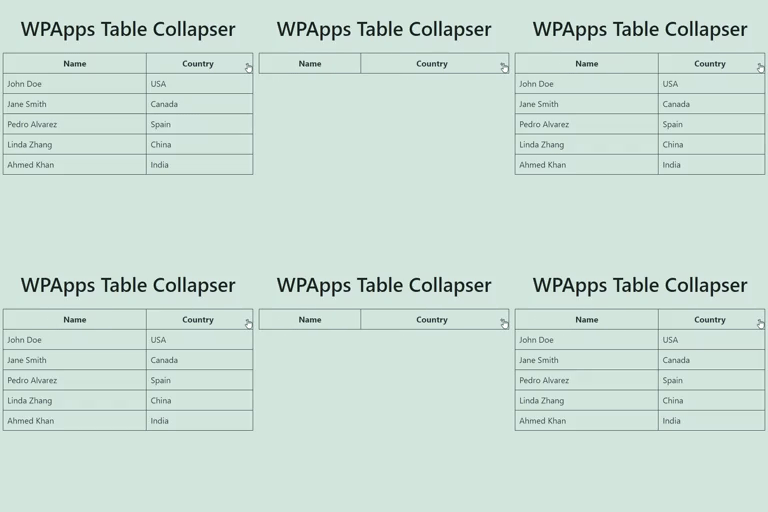
[⌊Example of a Collapsible Table:⌉⌊Example of a Collapsible Table:⌉[
**Example of a Collapsible Table:**
[⌊Settings Page:⌉⌊Settings Page:⌉[
**Settings Page:**
[⌊Detailed Guidelines on CSS Customization:⌉⌊Detailed Guidelines on CSS Customization
:⌉[
**Detailed Guidelines on CSS Customization:**
[⌊Responsive Table View:⌉⌊Responsive Table View:⌉[
**Responsive Table View:**
[⌊Block Support:⌉⌊Block Support:⌉[
**Block Support:**
## Àwọn ìdí
Plugin yìí pèsè 1 ìdí.
* Table Collapser A block that makes tables collapsible.
## Ìgbéwọlẹ̀
1. Upload the `wpapps-table-collapser` folder to the `/wp-content/plugins/` directory.
2. Activate the plugin through the ‘Plugins’ menu in WordPress.
3. Add the `collapsible-table` class to any table you want to make collapsible.
## FAQ
### Does the table require any specific structure?
For optimal functionality, the table should have a `` tag defining the header.
The collapsing functionality is primarily activated by clicking on this header.
However, if you enable the “Allow Table Without ``” option in the settings,
the plugin will also work without a ``.
### Can I style the toggle indicator?
Yes, you can style the toggle indicator by targeting the `.toggle-indicator` class
in your CSS.
### How do I set a custom title for the mobile view?
You can add a `data-title` attribute to your table element to set a custom title
that will be displayed in the mobile compact view.
### Is the plugin compatible with the Gutenberg block editor?
Yes, the plugin includes a Gutenberg block for easy creation and management of collapsible
tables.
## Àwọn àgbéyẹ̀wò
Kò sí àwọn àgbéyẹ̀wò fún plugin yìí.
## Àwọn Olùkópa & Olùgbéejáde
“WPApps Table Collapser” jẹ́ ètò ìṣàmúlò orísun ṣíṣí sílẹ̀. Àwọn ènìyàn wọ̀nyí ti
ṣe ìkópa sí plugin yìí.
Àwọn Olùkópa
* [ Hefin Dsouza ](https://profiles.wordpress.org/hefind/)
[Túmọ̀ “WPApps Table Collapser” sí èdè rẹ.](https://translate.wordpress.org/projects/wp-plugins/wpapps-table-collapser)
### Ṣe o nífẹ̀ẹ́ sí ìdàgbàsókè?
[Ṣàwárí koodu](https://plugins.trac.wordpress.org/browser/wpapps-table-collapser/),
ṣàyẹ̀wò [ibi ìpamọ́ SVN](https://plugins.svn.wordpress.org/wpapps-table-collapser/),
tàbí ṣe àgbékalẹ̀ sí [àkọsílẹ̀ ìdàgbàsókè](https://plugins.trac.wordpress.org/log/wpapps-table-collapser/)
nípasẹ̀ [RSS](https://plugins.trac.wordpress.org/log/wpapps-table-collapser/?limit=100&mode=stop_on_copy&format=rss).
## Àkọsílẹ̀ àwọn àyípadà
#### 1.1.0
* Fixed a bug where the block editor css gets loaded in the front-end.
#### 1.0.0
* Initial release.
## Àkójọpọ̀ Meta
* Ẹ̀yà **1.1.0**
* Ìgbàgbọ́hùn tó kẹ́yìn **ọdún 2 sẹ́yìn**
* Àwọn ìgbéwọlẹ̀ tó ṣiṣẹ́ **10+**
* Ẹ̀yà WordPress ** 4.0 tàbí ju bẹ́ẹ̀ lọ **
* Dánwò dé **6.6.7**
* Ẹ̀yà PHP ** 5.6 tàbí ju bẹ́ẹ̀ lọ **
* Èdè
* [English (US)](https://wordpress.org/plugins/wpapps-table-collapser/)
* Àwọn àmì
* [block](https://yor.wordpress.org/plugins/tags/block/)[responsive table](https://yor.wordpress.org/plugins/tags/responsive-table/)
[table](https://yor.wordpress.org/plugins/tags/table/)[toggle](https://yor.wordpress.org/plugins/tags/toggle/)
* [Ìwòye Tó Péye](https://yor.wordpress.org/plugins/wpapps-table-collapser/advanced/)
## Àwọn ìbò
Kò sí ìwádìí tí a tíì fi ránṣẹ́.
[Your review](https://wordpress.org/support/plugin/wpapps-table-collapser/reviews/#new-post)
[Wo gbogbo àwọn àgbéyẹ̀wò](https://wordpress.org/support/plugin/wpapps-table-collapser/reviews/)
## Àwọn Olùkópa
* [ Hefin Dsouza ](https://profiles.wordpress.org/hefind/)
## Ìrànlọ́wọ́
Nǹkan wà tí o fẹ́ sọ? Ṣé o nílò ìrànlọ́wọ́?
[Wo àpéjọ ìrànlọ́wọ́](https://wordpress.org/support/plugin/wpapps-table-collapser/)