Description
Do you write posts in different languages that have different directions?
This plugin enables a feature in the post editor which allow writing texts in Left-to-Right and Right-to-Left directions in the same post (or page) so you can write in English (and any other LTR language) and also RTL languages like Arabic, Persian and Hebrew.
Simply look for the new buttons added to the post editor after installing the plugin. (See the screenshots for better understanding)
اضافة زرارين لشريط التحرير لتمكين تحويل النص للقراءة من اليمين لليسار مثل اللغة العربية والفارسية والعبرية
- Note: This plugin will not change the direction of the post title, since that is controlled by the theme.
Screenshots
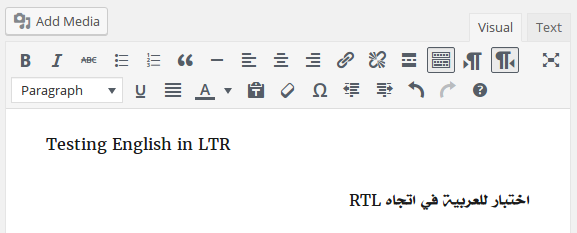
The post editor showing the new direction buttons. 
Switching to the text editor shows the added direction to the RTL line. 
A test post showing the correct alignment for the languages.
Installation
Search for the plugin “wp-rtl” from the plugin page inside your WordPress dashboard, or to manually install it do the following:
- Upload the folder (wp-rtl) to the plugins directory (wp-content/plugins).
- Activate the plugin through the ‘Plugins’ menu in WordPress
- Clear your browser cache (This is important otherwise you will see the cached TinyMCE).
FAQ
- Installation Instructions
-
Search for the plugin “wp-rtl” from the plugin page inside your WordPress dashboard, or to manually install it do the following:
- Upload the folder (wp-rtl) to the plugins directory (wp-content/plugins).
- Activate the plugin through the ‘Plugins’ menu in WordPress
- Clear your browser cache (This is important otherwise you will see the cached TinyMCE).
Reviews


Contributors & Developers
“WP-RTL” is open source software. The following people have contributed to this plugin.
Contributors
Translate “WP-RTL” into your language.
Interested in development?
Browse the code, check out the SVN repository, or subscribe to the development log by RSS.
Changelog
- 1.0 Fix for button styling due to WP inconsistent change of style
- 0.3 Fixed for WP 3.9
- 0.2 Fixed compatibility issue with WordPress 2.8
- 0.1 First release