

Àpèjúwe
Search Regex adds a powerful set of search and replace functions to WordPress posts, pages, custom post types, and other data sources. These go beyond the standard searching capabilities, and allow you to search and replace almost any data stored on your site. In addition to simple searches you have the full power of PHPÌtumọ̀ Yorùbá: ’s regular expressions at your disposal.
You can use this to do things like:
Ìtumọ̀ Yorùbá: – Help migrate a site from one domain to another
Ìtumọ̀ Yorùbá: – Update URLs in links and images
Ìtumọ̀ Yorùbá: – Perform site-wide changes
Search filters can be created to match any column of any WordPress table. For example:
Ìtumọ̀ Yorùbá: – Find all posts in a category
Ìtumọ̀ Yorùbá: – Find all post meta data without a post
Ìtumọ̀ Yorùbá: – Find all posts in a date range
Search Regex handles small and large sites.
Search Regex has been tested with PHP from 7.4 to 8.4.
What can I search?
You can search:
Ìtumọ̀ Yorùbá: – Posts
Ìtumọ̀ Yorùbá: – Pages
Ìtumọ̀ Yorùbá: – Any custom post type
Ìtumọ̀ Yorùbá: – Comments (including spam)
Ìtumọ̀ Yorùbá: – Users
Ìtumọ̀ Yorùbá: – Meta data
Ìtumọ̀ Yorùbá: – WordPress options
Full regular expression support is provided, and you can capture data and use it in the replacement.
Actions
A variety of actions can be performed on matching results:
Ìtumọ̀ Yorùbá: – Modify and replace the result
Ìtumọ̀ Yorùbá: – Delete the result
Ìtumọ̀ Yorùbá: – Export to CSV and SQL
Ìtumọ̀ Yorùbá: – Perform custom PHP action
Modify and Replace Data
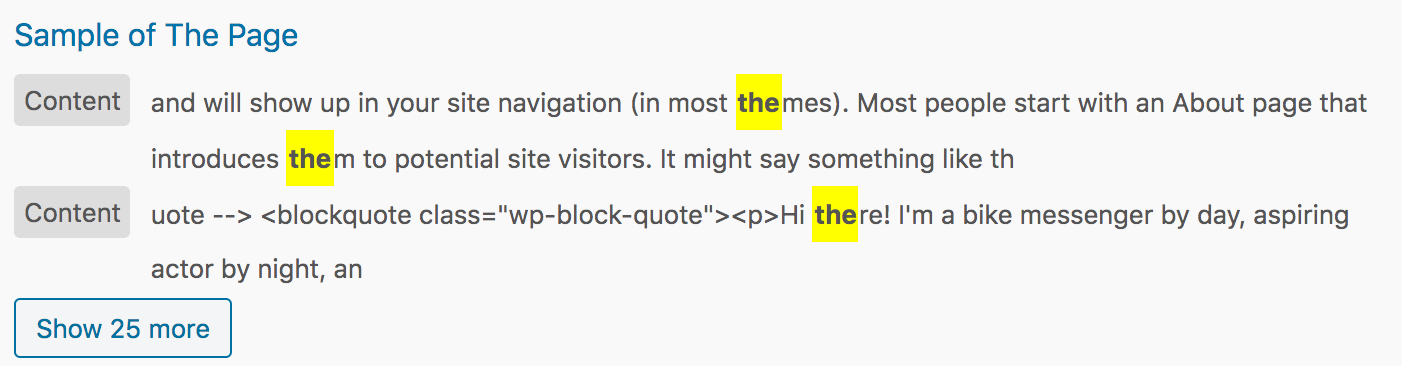
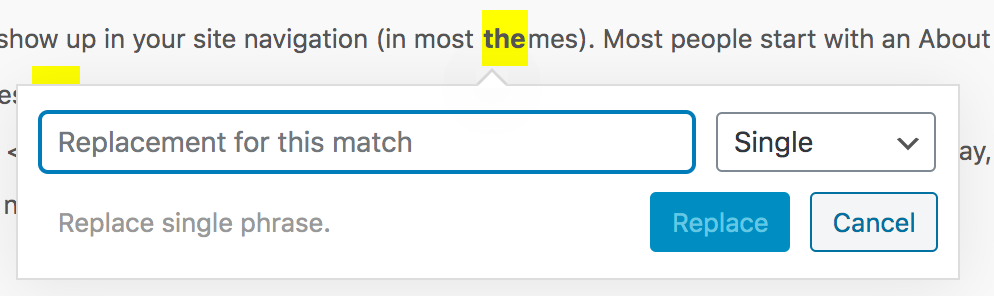
Results can be individually modified by clicking on the item to change, and using the popup modifier.
Bulk modifications can be performed against all matching results.
The types of modification depend on the data being changed:
Ìtumọ̀ Yorùbá: – Numbers can be added or subtracted to existing numbers
Ìtumọ̀ Yorùbá: – Hours, days, weeks, and months, can be added to dates
Ìtumọ̀ Yorùbá: – Tags and categories can be added, removed, and substitued
Custom shortcodes are supported that allow dynamic data to be included:
Ìtumọ̀ Yorùbá: – Add the current date and time, in any format, to content
Ìtumọ̀ Yorùbá: – Insert data from other columns. For example, insert the category into the title
Ìtumọ̀ Yorùbá: – Transform existing data. For example, convert case, change underscores to dashes.
Example uses
Some ideas for potential uses:
Ìtumọ̀ Yorùbá: – Delete all comments that match a phrase
Ìtumọ̀ Yorùbá: – Add a category to all matching posts
Ìtumọ̀ Yorùbá: – Remove orphaned meta data
Support
Please submit bugs, patches, and feature requests to:
https://github.com/johngodley/search-regex
Please submit translations to:
https://translate.wordpress.org/projects/wp-plugins/search-regex
Translations
Translations are provided by WordPress itself. You can update the translations by going to the Dashboard > Updates section of WP admin.
Documentation
Full documentation can be found on the Search Regex site.
Àwọn àwòrán ìbòjú
Ìgbéwọlẹ̀
The plugin is simple to install:
- Download
search-regex.zip - Unzip
- Upload
search-regexdirectory to your/wp-content/pluginsdirectory - Go to the plugin management page and enable the plugin
- Configure the options from the
Tools/Search Regexpage
You can find full details of installing a plugin on the plugin installation page.
Àwọn àgbéyẹ̀wò


Àwọn Olùkópa & Olùgbéejáde
“Search Regex” jẹ́ ètò ìṣàmúlò orísun ṣíṣí sílẹ̀. Àwọn ènìyàn wọ̀nyí ti ṣe ìkópa sí plugin yìí.
Àwọn Olùkópa
A ti túmọ̀ “Search Regex” sí àwọn èdè agbègbè 10. Ọpẹ́lọpẹ́ fún àwọn atúmọ̀ èdè fún àwọn ìkópa wọn.
Túmọ̀ “Search Regex” sí èdè rẹ.
Ṣe o nífẹ̀ẹ́ sí ìdàgbàsókè?
Ṣàwárí koodu, ṣàyẹ̀wò ibi ìpamọ́ SVN, tàbí ṣe àgbékalẹ̀ sí àkọsílẹ̀ ìdàgbàsókè nípasẹ̀ RSS.
Àkọsílẹ̀ àwọn àyípadà
3.5.1 Ìtumọ̀ Yorùbá: – October 6th 2026
- Fix security issue with serialized user meta (found by R3D)
- DonÌtumọ̀ Yorùbá: ’t allow serialized data to be saved (partial serialized support is removed)
- Improve shortcode handling
- Fix bug replacing shortcodes in some situations
3.5 Ìtumọ̀ Yorùbá: – October 5th 2026
- Simplify and improve optional capabilities system
- Fix ‘remove’ dropdown not enabling replace button
3.4.4 Ìtumọ̀ Yorùbá: – August 29th 2026
- Fix error when replacing single result
- WordPress 7.1 compatibility
3.4.3 Ìtumọ̀ Yorùbá: – July 25th 2026
- Sanitise CSV exports
- Fix ‘run action’
3.4.2 Ìtumọ̀ Yorùbá: – May 31st 2026
- Better older PHP compatibility
- Improve UTF8 collation searching
- Improve WP 7.0 admin styling
3.4.1 Ìtumọ̀ Yorùbá: – February 28th 2026
- Fix problem with export data
3.4 Ìtumọ̀ Yorùbá: – February 14th 2026
- Include term description in searches
3.3.1 Ìtumọ̀ Yorùbá: – January 16th 2026
- Fix replace all with regex
- Fix presets on page load
- Fix crash when adding a modification
- Fix missing source param from column context
- Add browser extension error detection
- Add mid-update cache clearing detection
3.3.0 Ìtumọ̀ Yorùbá: – January 11th 2026
- Add a simple/advanced mode toggle
- Add delete confirmation dialog
- Improve case-sensitive search to properly handle emojis and multi-byte characters
- Improved client code
- Use PHP autoloading for better performance
- Bump minimum PHP to 7.4
3.2 Ìtumọ̀ Yorùbá: – December 22nd 2025
- Add WP CLI functions
- Variety of small fixes and improvements
- Update for WordPress 6.9
- Bump PHP minimum to 7.2
3.1.2 Ìtumọ̀ Yorùbá: – December 29th 2024
- Fix crash when loading from a preset with an ‘includes any’
3.1.1 Ìtumọ̀ Yorùbá: – November 23rd 2024
- Update for WordPress 6.7
3.1.0 Ìtumọ̀ Yorùbá: – August 8th 2024
- Update for latest WP
- Fix export of regular expression result
- Switch to WP core translations
- See changelog.txt for more details