
Description
Adds a beautiful, customizable sign-up bar to the top of your WordPress site. This bar is guaranteed to get the attention of your visitor and
increase your Mailchimp subscribers.
This plugin is an add-on for the MC4WP: Mailchimp for WordPress plugin.
Mailchimp Sign-Up Bar, at a glance..
Mailchimp Top Bar adds a simple yet beautiful & customizable opt-in bar to the top or bottom of your WordPress site.
Using this bar, people can subscribe to a Mailchimp list of your choice.
- Guaranteed to boost conversions.
- Unobtrusive, visitors can easily dismiss the bar.
- Easy to install & configure, just select a Mailchimp list and you’re good to.
- Customizable, you can edit the bar text and colors from the plugin settings.
- The bar can be at the top or bottom of the visitor’s screen
- Lightweight, the plugin consists of just a single 4kb JavaScript file.
Development of Mailchimp Top Bar
Bug reports (and Pull Requests) for Mailchimp Top Bar are welcomed on GitHub. Please note that GitHub is not a support forum.
More information
- MC4WP: Mailchimp for WordPress
- Developers; follow or contribute to the Mailchimp Top Bar plugin on GitHub
Screenshots
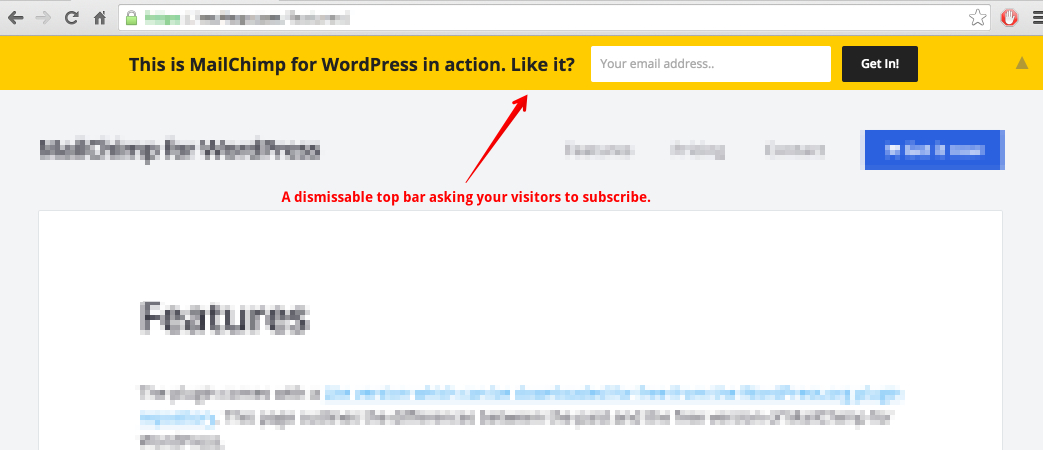
The Mailchimp Top Bar in action on the Mailchimp for WordPress site. 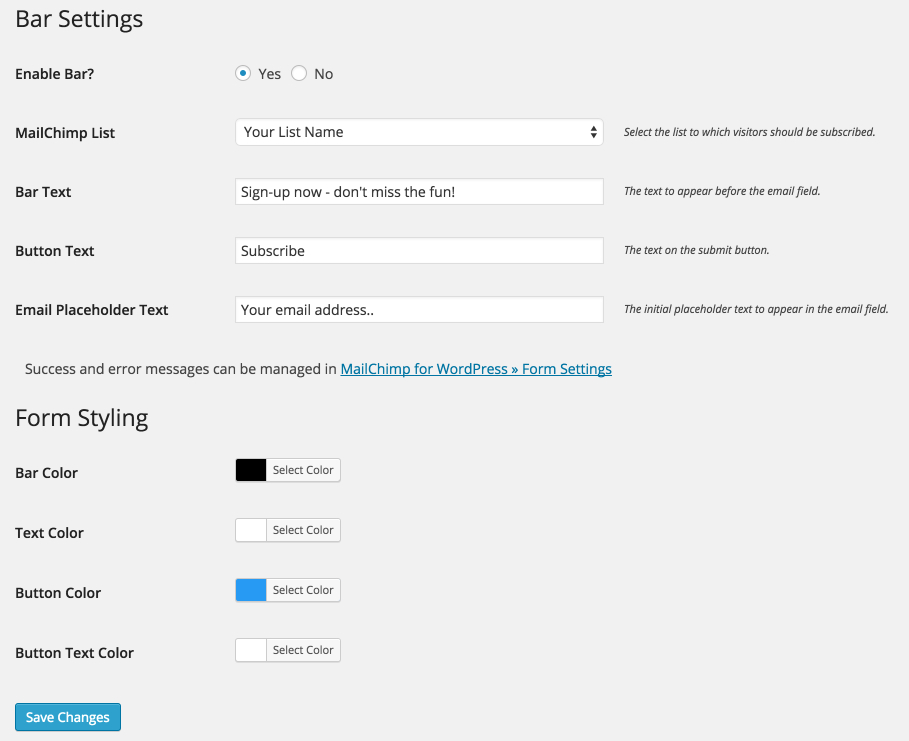
The settings page of the Mailchimp Top Bar plugin.
Installation
Mailchimp for WordPress
Since this plugin depends on the Mailchimp for WordPress plugin, you will need to install that first.
Installing Mailchimp Top Bar
- In your WordPress admin panel, go to Plugins > New Plugin, search for Mailchimp Top Bar and click “Install now“
- Alternatively, download the plugin and upload the contents of
mailchimp-top-bar.zipto your plugins directory, which usually is/wp-content/plugins/. - Activate the plugin
- Set your Mailchimp API key in Mailchimp for WP > Mailchimp Settings.
- Select a Mailchimp list to subscribe to in Mailchimp for WP > Top Bar.
- (Optional) Customize the look & position of your opt-in bar.
FAQ
-
How to disable the bar on certain pages?
-
For now, you will have to use a filter to disable the bar on certain pages. The following example only loads the Top Bar on your blog post pages.
add_filter( 'mctb_show_bar', function( $show ) {
    return is_single();
} );
Another example, this only loads the bar on your “contact” page.
add_filter( 'mctb_show_bar', function( $show ) {
    return is_page('contact');
} );
Have a look at the Conditional Tags page for all accepted functions.
-
How to add a name field to the bar?
-
You can use the following code snippet to show a “NAME” field in your bar.
add_action( 'mctb_before_submit_button', function() { echo '<input type="text" name="NAME" placeholder="Your name" />'; }); add_filter( 'mctb_subscriber_data', function( $subscriber ) { if( ! empty( $_POST['NAME'] ) ) { $subscriber->merge_fields['NAME'] = sanitize_text_field( $_POST['NAME'] ); } return $subscriber; }); -
How to hide the bar on small screens?
-
Adding the following CSS to your site should hide the bar on all screens smaller than 600px. The Simple Custom CSS plugin is great for adding custom CSS.
@media( max-width: 600px ) { #mailchimp-top-bar { display: none !important; } } -
I think I found a bug. What now?
-
Please report it on GitHub issues if it’s not in the list of known issues.
-
I have another question
-
Please open a topic on the WordPress.org plugin support forums.
Reviews


Contributors & Developers
“MC4WP: Mailchimp Top Bar” is open source software. The following people have contributed to this plugin.
Contributors


“MC4WP: Mailchimp Top Bar” has been translated into 1 locale. Thank you to the translators for their contributions.
Translate “MC4WP: Mailchimp Top Bar” into your language.
Interested in development?
Browse the code, check out the SVN repository, or subscribe to the development log by RSS.
Changelog
1.6.0 – Jan 4, 2022
- JS file now has
deferattribute so it is not render blocking. - Stylesheet is now inserted through JS, so it is not render blocking.
- Animations now entirely handled using CSS.
- JS file is now 20% smaller because of the above (2.6 kB gzipped).
1.5.6 – Dec 1, 2022
- Minor JS improvements to shrink ~500 bytes off script file.
- Prepare admin tab navigation for upcoming Mailchimp for WordPress release.
1.5.5 – May 14, 2021
- Always use minified asset file, regardless of
SCRIPT_DEBUGsetting. - Add nonce to all URL’s using
_mc4wp_actionparameter.
1.5.4 – May 7, 2021
- Update classnames to work with MailChimp for WordPress version 4.8.4 (and up).
- Minor JS optimizations.
1.5.3 – Mar 30, 2021
- Fix typo in help text.
- Show bar server-side to speed-up height calculation.
1.5.2 – Mar 9, 2020
- Add setting to disable bar (stop loading it altogether) after it is used.
- Increase default cookie lifetime to 1 year.
1.5.1 – Jan 21, 2020
- Fade response element using CSS animations for better performance.
- Various minor performance improvements.
1.5.0 – Oct 7, 2019
Compatibility with Mailchimp for WordPress version 4.6.
1.4.1 – Sep 11, 2019
Changes
- Change name to MC4WP: Mailchimp Top Bar.
1.4.0 – Sep 4, 2019
Improvements
- Add (advanced) setting to quickly disable the top bar on certain pages.
1.3.2 – Aug 8, 2018
Fixes
- Required fields notice on selected list was not showing because of invalid list property.
Improvements
- Prefix internal CSS classes for improved compatibility with other themes or plugins applying global admin styles.
1.3.1 – May 29, 2018
Improvements
- 30% reduction in script file size because of removed JS dependency.
- Stop setting unused cookie when Top Bar form is used to subscribe.
- Add mctb_after_submit_button action hook.
- Improve animation performance.
1.3 – November 1, 2017
Improvements
- Form now submits over AJAX, no longer reloading the entire page.
- Added
forattribute to label elements, thanks gabriel-kaam. - Added
mctb_replace_interestsfilter hook.
1.2.16 – January 19, 2017
Various minor code improvements.
1.2.15 – September 8, 2016
Improvements
- Improved responsiveness when bar has additional input fields.
- Add
requiredattribute to email input.
1.2.14 – August 29, 2016
Fixes
- Top padding for small screens with admin bar.
Improvements
- Better bar responsiveness when window dimensions change on the fly (eg resizing a window or changing device orientation mode). (Thanks tech4him1!)
1.2.13 – August 2, 2016
Fixes
- Error in animating body padding back to its original value.
1.2.12 – July 21, 2016
Fixes
- Bar would crash when clicking toggle icon during bar animation.
Improvements
- Function scope generated JavaScript file to prevent Browserify clashes with other loaded scripts.
- Make sure script works even though it’s loaded in the head section.
- Preparations for upcoming Mailchimp for WordPress v4.0 release.
Additions
- Added Spanish language files, thanks to Ángel Guzmán Maeso
- Added
mctb_datafilter, to filter form data before it is processed.
Deprecated
- Deprecated
mctb_merge_varsfilter.
1.2.11 – July 8, 2016
Improvements
- Completely removed optional jQuery dependency. The plugin now uses JavaScript animations, resulting in a much smoother experience.
1.2.10 – April 12, 2016
Fixes
- Closed bar would still overlap underlying elements (like fixed top menu’s).
1.2.9 – March 16, 2016
Fixes
Top Bar was invisible on some themes because of z-index being too low.
1.2.8 – March 15, 2016
Improvements
- Make sure top bar doesn’t appear on top of WP admin bar.
- Hardened CSS styles for improved theme compatability.
1.2.7 – January 26, 2016
Improvements
- Miscellaneous code improvements
Additions
- Add support for new debug log in Mailchimp for WordPress 3.1
1.2.6 – January 4, 2016
Additions
-
Option to “update existing subscribers” in Mailchimp, which is useful if you have added fields.
Improvements
-
Toggle icon now has a background color, for increased visibility.
- Toggle icon now stacks above or below bar on small screens.
1.2.5 – December 10, 2015
The plugin now requires Mailchimp for WordPress version 3.0 or higher.
Fixes
- Fixed column alignment in Appearance tab, thanks Chantal Coolsma!
Improvements
- Improved admin notice when dependencies are not installed.
1.2.4 – November 22, 2015
- Compatibility for the upcoming Mailchimp for WordPress 3.0 release tomorrow.
- Added
mctb_subscribedfilter.
1.2.3 – November 13, 2015
Improvements
- Minor refactoring in the way the plugin is bootstrapped.
1.2.2 – September 10, 2015
Fixes
- Honeypot field being auto-completed in some browsers.
- Honeypot field was accessible by pressing “tab” key.
- Hardened security for cookie that tracks sign-up attempts.
1.2.1 – September 8, 2015
Fixes
- Response message was not showing for some themes.
Improvements
- Better mobile responsiveness
1.2 – September 3, 2015
Improvements
- The bar will now auto-dismiss after every successful sign-up.
- Placeholders will now work in Internet Explorer 7, 8 & 9 as well.
Additions
- Added options for double opt-in and sending Mailchimp’s “welcome email”.
- Added
mctb_before_labelaction allowing you to add HTML before the label-element. - Added
mctb_before_email_fieldaction allowing you to add HTML before the email field. - Added
mctb_before_submit_buttonaction allowing you to add HTML before the submit button. - Added
mctb_form_actionfilter allowing you to set a custom form action.
1.1.3 – June 23, 2015
Fixes
- Fixes fatal error when visiting settings page on some servers
1.1.2 – June 18, 2015
Improvements
- Fixes height of response message
- CSS improvements for compatibility with various popular themes
1.1.1 – June 12, 2015
Fixes
- Fixes unclickable admin bar (or fixed navigation menu’s).
Improvements
- Various improvements to bar CSS so it can be easily overridden.
- Fix vertical alignment of toggle icon.
1.1 – June 10, 2015
Improvements
- Bar no longer requires jQuery script, saving an additional HTTP request and 100kb
Additions
- Position option: top or bottom
- New filter:
mctb_mailchimp_list(set lists to subscribe to) - Lithuanian translation, thanks to Aleksandr Charkov
1.0.8 – May 6, 2015
Fixes
- Compatibility with Mailchimp for WordPress Lite v2.3 and Mailchimp for WordPress Pro v2.7.
1.0.7 – April 15, 2015
Fixes
mctb_show_barfilter was not functioning properly with some themes.- Form always errored when using WPML with String Translations.
Improvements
- Toggle icon is no longer shown for users without JavaScript.
1.0.6 – March 17, 2015
Fixes
- Compatibility issues with latest version of Enfold theme
- Conflict with other plugins shipping very old versions of Composer
Improvements
- Allow simple inline tags in the bar text
1.0.5 – February 25, 2015
Fixes
- Bar not loading in some themes after latest update
- Colors not working because of missing leading
#value. Color settings are now validated before saving them.
1.0.4 – February 23, 2015
Fixes
- Styling issues with Enfold theme.
Additions
- Settings page now uses a tabbed interface.
- You can now set a “redirect url” in the bar settings
- All form response messages can now be customised for the bar form
1.0.3 – February 17, 2015
Improvements
- Bar will now show “already subscribed” message from Mailchimp for WordPress when a person is already on the selected list.
- Response message will now show and fadeout after 3 seconds.
- Various usability improvements for the settings screen.
- Improved spam detection.
- Major JS performance improvements.
Additions
- Multiple new anti-spam measures
- WPML compatibility
1.0.2 – February 12, 2015
Improvements
- Better CSS reset for elements inside the bar
- Other minor CSS improvements
Additions
- Top Bar sign-ups are now shown in the log for Mailchimp for WordPress Pro.
1.0.1 – February 4, 2015
Fixes
- The plugin will no longer overlap header menu’s or other elements
Additions
- You can now set the bar as “sticky”, meaning it will stick to the op your window, even when scrolling.
- You can now choose the size of the bar, small/medium/big.
- Added Dutch translation files.
Improvements
- The menu item will now show above the item asking you to upgrade to Mailchimp for WordPress Pro.
Please update the Mailchimp for WordPress plugin before updating to this version.
1.0 – January 28, 2015
Initial release