Title: Kombat Links
Author: d_alinus2004
Published: Èbìbí 3, 2026
Last modified: Èbìbí 3, 2026
---
Ṣàwárí àwọn plugin
# Kombat Links
Láti ọwọ́ [d_alinus2004](https://profiles.wordpress.org/d_alinus2004/)
[Ṣe ìgbàsílẹ̀](https://downloads.wordpress.org/plugin/kombat-links.zip)
* [Àwọn àlàyé](https://yor.wordpress.org/plugins/kombat-links/#description)
* [Àwọn àgbéyẹ̀wò](https://yor.wordpress.org/plugins/kombat-links/#reviews)
* [Ìgbéwọlẹ̀](https://yor.wordpress.org/plugins/kombat-links/#installation)
* [Ìdàgbàsókè](https://yor.wordpress.org/plugins/kombat-links/#developers)
[Ìrànlọ́wọ́](https://wordpress.org/support/plugin/kombat-links/)
## Àpèjúwe
**Kombat Links** automates internal linking across your entire WordPress site. Instead
of manually editing every post to add links, you define keyword-to-URL rules once—
and the plugin handles everything else automatically.
Every time you publish or update a post, Kombat Links scans the content and inserts
the correct internal links based on your active rules. Existing content can be updated
in bulk with a single click.
#### Key Features
* **Automatic link insertion** — links are added on every post save, automatically
* **Bulk Re-link** — apply all rules to existing posts and pages with a real-time
progress bar
* **Usage tracking** — see exactly how many posts contain each ruleÌtumọ̀ Yorùbá:’
s link; click to see the full list
* **Post type targeting** — apply rules to Posts, Pages, or both
* **WooCommerce support** — link to WooCommerce products directly from the rule
editor (when WooCommerce is active)
* **Smart Suggestions** — the plugin suggests potential link targets based on your
existing page titles
* **Non-destructive** — links are never inserted inside headings (H1–H6) or inside
existing `` tags
* **Remove all links** — strip all Kombat Links links from your entire site in
one click
* **Settings control** — configure max links per post, first-occurrence-only mode,
case sensitivity, and new-tab behaviour
#### How It Works
1. Go to **Smart Links** in your WordPress admin menu
2. Add a rule: type a keyword and select the destination post or page
3. Click **Re-link All Posts** to apply rules to existing content
4. From that point on, every new or updated post is linked automatically
#### SEO Benefits
Internal linking is one of the most effective and most neglected SEO techniques.
Kombat Links helps you build a consistent internal link structure without spending
hours manually editing posts.
#### Links are stored as standard HTML
Kombat Links inserts links directly into post content as plain `` tags — no shortcodes,
no overlays, no dynamic injections. Links persist even if the plugin is deactivated.
### Upgrade to PRO
Looking for more advanced features? **Smart Linker PRO** adds:
* Per-rule settings: nofollow, sponsored, UGC rel attributes
* Bold link text per rule
* Custom icon per link ( 🔗 or custom)
* Extra CSS class per rule
* External URL support (not just internal pages)
* Custom Post Types support
* Exclude specific posts from auto-linking
* Import / Export rules (JSON)
* Drag-to-reorder rules
[Get Smart Linker PRO ](https://webdesign-profesional.com/kombat-links/)
## Àwọn àwòrán ìbòjú
* [[
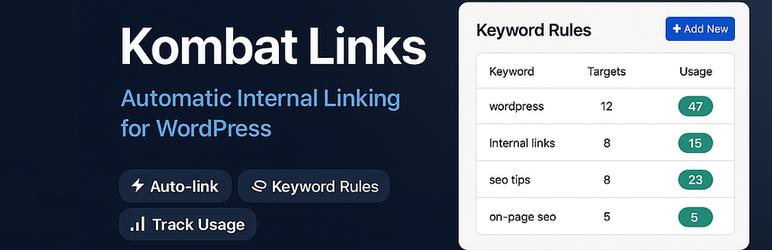
* The Kombat Links admin panel showing active rules with usage counters.
## Ìgbéwọlẹ̀
1. Upload the `kombat-links` folder to the `/wp-content/plugins/` directory, or install
directly from the WordPress plugin directory.
2. Activate the plugin through the **Plugins** menu in WordPress.
3. Navigate to **Smart Links** in the admin menu.
4. Add your first keyword rule and click **Re-link All Posts**.
## FAQ
### Will this slow down my site?
No. Kombat Links only runs when a post is saved in the admin, or during the bulk
re-link batch process. It has no impact on front-end page load time.
### What happens to my links if I deactivate the plugin?
Links inserted by Kombat Links are stored as plain HTML in your post content. They
will continue to work as normal links even after the plugin is deactivated or deleted.
### Can I link to WooCommerce products?
Yes. When WooCommerce is active, products appear as link targets in the rule editor
under the “Products” group.
### What does “first occurrence only” mean?
When this setting is enabled (recommended), only the first occurrence of a keyword
in each post will be linked. This avoids excessive linking and follows SEO best
practices.
### Why does my rule show 0 uses after I add it?
Rules are applied when a post is saved. To apply rules to existing posts, click **
Re-link All Posts** in the Bulk Actions section.
### How many links per post should I set?
We recommend 3–5 links per post. GoogleÌtumọ̀ Yorùbá: ’s guidelines suggest that
internal links should feel natural and relevant. Too many links on a single page
can dilute their value.
### Does Kombat Links create links inside headings?
No. The plugin never inserts links inside H1–H6 tags or inside existing `` tags—
your content structure is always preserved.
## Àwọn àgbéyẹ̀wò
Kò sí àwọn àgbéyẹ̀wò fún plugin yìí.
## Àwọn Olùkópa & Olùgbéejáde
“Kombat Links” jẹ́ ètò ìṣàmúlò orísun ṣíṣí sílẹ̀. Àwọn ènìyàn wọ̀nyí ti ṣe ìkópa
sí plugin yìí.
Àwọn Olùkópa
* [ d_alinus2004 ](https://profiles.wordpress.org/d_alinus2004/)
[Túmọ̀ “Kombat Links” sí èdè rẹ.](https://translate.wordpress.org/projects/wp-plugins/kombat-links)
### Ṣe o nífẹ̀ẹ́ sí ìdàgbàsókè?
[Ṣàwárí koodu](https://plugins.trac.wordpress.org/browser/kombat-links/), ṣàyẹ̀wò
[ibi ìpamọ́ SVN](https://plugins.svn.wordpress.org/kombat-links/), tàbí ṣe àgbékalẹ̀
sí [àkọsílẹ̀ ìdàgbàsókè](https://plugins.trac.wordpress.org/log/kombat-links/) nípasẹ̀
[RSS](https://plugins.trac.wordpress.org/log/kombat-links/?limit=100&mode=stop_on_copy&format=rss).
## Àkọsílẹ̀ àwọn àyípadà
#### 1.0.0
* Initial release.
* Keyword-to-URL rule management.
* Automatic link insertion on post save.
* Bulk re-link with real-time progress bar.
* Usage tracking per rule with post list modal.
* Post type targeting (Posts, Pages, or both).
* WooCommerce product support.
* Smart Suggestions based on existing page titles.
* Remove All Smart Links bulk action.
* Settings: max links per post, first-occurrence-only, case sensitivity, new tab.
## Àkójọpọ̀ Meta
* Ẹ̀yà **1.0.0**
* Ìgbàgbọ́hùn tó kẹ́yìn **ọ̀sẹ̀ 1 sẹ́yìn**
* Àwọn ìgbéwọlẹ̀ tó ṣiṣẹ́ **Tó kéré sí 10**
* Ẹ̀yà WordPress ** 5.0 tàbí ju bẹ́ẹ̀ lọ **
* Dánwò dé **6.9.4**
* Ẹ̀yà PHP ** 7.4 tàbí ju bẹ́ẹ̀ lọ **
* Èdè
* [English (US)](https://wordpress.org/plugins/kombat-links/)
* Àwọn àmì
* [automatic linking](https://yor.wordpress.org/plugins/tags/automatic-linking/)
[content](https://yor.wordpress.org/plugins/tags/content/)[internal linking](https://yor.wordpress.org/plugins/tags/internal-linking/)
[internal links](https://yor.wordpress.org/plugins/tags/internal-links/)[seo](https://yor.wordpress.org/plugins/tags/seo/)
* [Ìwòye Tó Péye](https://yor.wordpress.org/plugins/kombat-links/advanced/)
## Àwọn ìbò
Kò sí ìwádìí tí a tíì fi ránṣẹ́.
[Your review](https://wordpress.org/support/plugin/kombat-links/reviews/#new-post)
[See all reviews](https://wordpress.org/support/plugin/kombat-links/reviews/)
## Àwọn Olùkópa
* [ d_alinus2004 ](https://profiles.wordpress.org/d_alinus2004/)
## Ìrànlọ́wọ́
Nǹkan wà tí o fẹ́ sọ? Ṣé o nílò ìrànlọ́wọ́?
[Wo àpéjọ ìrànlọ́wọ́](https://wordpress.org/support/plugin/kombat-links/)