Title: Collapsing Pages
Author: robfelty
Published: Igbe 29, 2008
Last modified: Ṣẹrẹ 1, 2024
---
Ṣàwárí àwọn plugin
Plugin yìí **kò tíì ṣe àyẹ̀wò pẹ̀lú àwọn ìtújáde mẹ́ta pàtàkì tó kẹ́yìn ti WordPress**.
Ó lè jẹ́ pé a kò tọ́jú tàbí ṣe àtìlẹ́yìn fún un mọ́, ó sì lè ní àwọn ọ̀ràn ìbámu
nígbà tí a bá lò ó pẹ̀lú àwọn ẹ̀yà WordPress tuntun.
# Collapsing Pages
Láti ọwọ́ [robfelty](https://profiles.wordpress.org/robfelty/)
[Ṣe ìgbàsílẹ̀](https://downloads.wordpress.org/plugin/collapsing-pages.2.0.3.zip)
* [Àwọn àlàyé](https://yor.wordpress.org/plugins/collapsing-pages/#description)
* [Àwọn àgbéyẹ̀wò](https://yor.wordpress.org/plugins/collapsing-pages/#reviews)
* [Ìgbéwọlẹ̀](https://yor.wordpress.org/plugins/collapsing-pages/#installation)
* [Ìdàgbàsókè](https://yor.wordpress.org/plugins/collapsing-pages/#developers)
[Ìrànlọ́wọ́](https://wordpress.org/support/plugin/collapsing-pages/)
## Àpèjúwe
This is a very simple plugin that uses Javascript to form a collapsable set of
links in the sidebar for the pages. Every page corresponding to a given parent page
will be expanded.
It is largely based off of my Collapsing Pages and Collapsing Pages
plugins.
### WhatÌtumọ̀ Yorùbá: ’s new?
* 2.0.3 (2024.01.01)
- Fixed issue with subsubpages not closing correctly
- Got rid of some more warnings
- Tested with 6.4.2
* 2.0.2 (2023.12.01)
- Got rid of some warnings
- Updated deprecated property __experimentalGroup
- Tested with 6.4.1
* 2.0.1 (2023.06.16)
- Bug fixes
* 2.0.0 (2023.03.17)
- Updated to use Gutenberg block
* 1.0.1 (2016.05.09)
- Fixed bug where sometimes setting accordion to false broke javascript
* 1.0 (2015.08.12)
- Compatible with WordPress 4.3
- Fixed bug where expanding symbol showed up at lowest depth specified instead
(
thanks to tkibler for pointing it out)
- Added option to only display pages of the current subpage
- Added option to show top-level page (previously it was always shown)
- Added accordion style option
- Cleaned up widget settings
- improved style management, including the ability to specify style per widget
- Switched from unicode symbols to html entities
- Not showing tags for title if empty
- Fixed bug with title attribute of pages
- Totally rewrote javascript
### Options
If using the manual version, you can pass options either as an array, or using
the query style, just like for other wordpress functions such as wp_list_pages
```
$defaults=array(
'title' => __('Pages', 'collapsing-pages'),
'sortOrder'=> 'ASC' ,
'sort'=> 'pageName' ,
'defaultExpand'=> '',
'expand' => 0,
'depth' =>-1,
'inExcludePage' => 'exclude',
'linkToPage' => true,
'inExcludePages' => '',
'showPosts' => false,
'animate' => 0,
'useCookies' => true,
'postTitleLength' => 0,
'showTopLevel' => true,
'currentPageOnly' => false,
'debug' => false,
);
```
* inExcludePage
- Whether to include or exclude certain pages
* ‘exclude’ (default)
* ‘include’
* inExcludePages
- The pages which should be included or excluded
* showPosts
- Whether or not to include posts as well as pages. Default if false
* linkToPage
- True, clicking on a parent page title will link to that page (default)
- False, clicking on a parent page will expand to show sub-pages
* sort
- How to sort the pages. Possible values:
* ‘pageName’ the title of the page (default)
* ‘pageId’ the Id of the page
* ‘pageSlug’ the url of the page
* ‘menuOrder’ custom order specified in the pages settings
* sortOrder
- Whether pages should be sorted in normal or reverse
order. Possible values:
* ‘ASC’ normal order (a-z 0-9) (default)
* ‘DESC’ reverse order (z-a 9-0)
* expand
- The symbols to be used to mark expanding and collapsing. Possible values:
* ‘0’ Triangles (default)
* ‘1’ + Ìtumọ̀ Yorùbá: –
* ‘2’ [+] [-]
* ‘3’ images (you can upload your own if you wish)
* ‘4’ custom symbols
* customExpand
- If you have selected ‘4’ for the expand option, this character will be
used
to mark expandable link categories
* customCollapse
- If you have selected ‘4’ for the expand option, this character will be
used
to mark collapsible link categories
* postTitleLength
- Truncate post titles to this number of characters (default: 0 = donÌtumọ̀
Yorùbá: ’t
truncate)
* animate
- When set to true, collapsing and expanding will be animated
* useCookies
- When true, expanding and collapsing of pages is remembered for each
visitor.
When false, pages are always display collapsed (unless explicitly set to auto-
expand). Possible values:
* true (default)
* false
* showTopLevel
- True Ìtumọ̀ Yorùbá: – show top level pages (default)
- False Ìtumọ̀ Yorùbá: – only display sub-pages and below
* currentPageOnly
- True Ìtumọ̀ Yorùbá: – show only parent and sub pages of the current page
- False Ìtumọ̀ Yorùbá: – show all pages (subject to the include or exclude parameters
set) (default)
* debug
- When set to true, extra debugging information will be displayed in the
underlying
code of your page (but not visible from the browser). Use this option if you
are having problems
#### Examples
```
collapsPage('animate=true&sort=ASC&expand=3,inExcludePages=about')
```
This will produce a list with:
* animation on * shown in alphabetical order * using
images to mark collapsing and expanding * exclude page about
### Demo
I use this plugin in my blog at http://blog.robfelty.com
### CAVEAT
Currently this plugin relies on Javascript to expand and collapse the links.
If
a userÌtumọ̀ Yorùbá: ’s browser doesnÌtumọ̀ Yorùbá: ’t support javascript they wonÌtumọ̀
Yorùbá: ’t see the links to the posts, but the links to the pages will still work(
which is the default behavior in wordpress anyways)
## Àwọn àwòrán ìbòjú
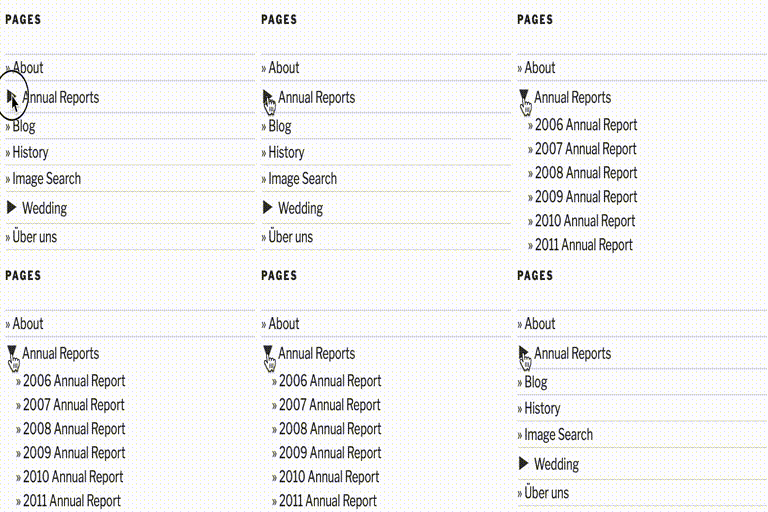
[⌊a few expanded pages with default theme, showing nested pages⌉⌊a few expanded
pages with default theme, showing nested pages⌉[
a few expanded pages with default theme, showing nested pages
[⌊a few expanded pages with default theme, showing drop down version⌉⌊a few expanded
pages with default theme, showing drop down version⌉[
a few expanded pages with default theme, showing drop down version
## Àwọn ìdí
Plugin yìí pèsè 1 ìdí.
* Collapsing Pages A Gutenberg block to show a collapsible list of your posts
organized by date
## Ìgbéwọlẹ̀
IMPORTANT! Please deactivate before upgrading, then re-activate the plugin.
MANUAL INSTALLATION (the only option for pre 2.3 wordpress, unless you have the
widget plugin installed)
Unpackage contents to wp-content/plugins/ so that the files are in a collapsPage
directory. Now enable the plugin. To use the plugin, change the following where
appropriate (most likely sidebar.php):
```
```
To something of the following:
```
\n";
if( function_exists('collapsPage') ) {
collapsPage();
} else {
wp_list_pages(...);
}
echo "\n";
?>
```
You can specify options if you wish. See the options section.
The above will fall back to the WP function for pages if you disable the plugin.
WIDGET INSTALLATION
For those who have widget capabilities, (default in WordPress 2.3+), installation
is easier.
Unzip contents to wp-content/plugins/ so that the files are in a collapsing-pages
directory. You must enable the Collapsing Pages plugin, then simply go the Presentation
> Widgets section and add the Collapsing Pages Widget.
## FAQ
### How do I change the style of the collapsing categories lists?
As of version 0.5.3, there are several default styles that come with
collapsing-
categories. You can choose from these in the settings panel, or you can create your
own custom style. A good strategy is to choose a default, then modify it slightly
to your needs.
The following classes are used:
* collapsing Ìtumọ̀ Yorùbá: – applied to all ul
and li elements * pages Ìtumọ̀ Yorùbá: – applied to all ul and li elements * list
Ìtumọ̀ Yorùbá: – applied to the top-level ul * item Ìtumọ̀ Yorùbá: – applied to
each li which has no sub-elements * expand Ìtumọ̀ Yorùbá: – applied to a page which
can be expanded (is currently collapsed) * collapse Ìtumọ̀ Yorùbá: – applied to
a page which can be collapsed (is currently expanded) * sym Ìtumọ̀ Yorùbá: – class
for the expanding / collapsing symbol
An example:
```
```
### How do I make the current page prominent in the list of pages?
The current page has the “self” class. By default, the “self” class style is
set
to bold. If you would like to change this, you can change it in the settings page.
## Àwọn àgbéyẹ̀wò
Kò sí àwọn àgbéyẹ̀wò fún plugin yìí.
## Àwọn Olùkópa & Olùgbéejáde
“Collapsing Pages” jẹ́ ètò ìṣàmúlò orísun ṣíṣí sílẹ̀. Àwọn ènìyàn wọ̀nyí ti ṣe ìkópa
sí plugin yìí.
Àwọn Olùkópa
* [ robfelty ](https://profiles.wordpress.org/robfelty/)
[Túmọ̀ “Collapsing Pages” sí èdè rẹ.](https://translate.wordpress.org/projects/wp-plugins/collapsing-pages)
### Ṣe o nífẹ̀ẹ́ sí ìdàgbàsókè?
[Ṣàwárí koodu](https://plugins.trac.wordpress.org/browser/collapsing-pages/), ṣàyẹ̀wò
[ibi ìpamọ́ SVN](https://plugins.svn.wordpress.org/collapsing-pages/), tàbí ṣe àgbékalẹ̀
sí [àkọsílẹ̀ ìdàgbàsókè](https://plugins.trac.wordpress.org/log/collapsing-pages/)
nípasẹ̀ [RSS](https://plugins.trac.wordpress.org/log/collapsing-pages/?limit=100&mode=stop_on_copy&format=rss).
## Àkọsílẹ̀ àwọn àyípadà
#### 1.0.1 (2016.05.09)
* Fixed bug where sometimes setting accordion to false broke javascript
#### 1.0 (2015.08.12)
* Compatible with WordPress 4.3
* Fixed bug where expanding symbol showed up at lowest depth specified instead
(
thanks to tkibler for pointing it out)
* Added option to only display pages of the current subpage
* Added option to show top-level page (previously it was always shown)
* Added accordion style option
* Cleaned up widget settings
* improved style management, including the ability to specify style per widget
* Switched from unicode symbols to html entities
* Not showing tags for title if empty
* Fixed bug with title attribute of pages
* Totally rewrote javascript
#### 0.6.1 (2010.06.21)
* Removed extraneous debugging info (subpagecount=)
#### 0.6 (2010.06.18)
* Fixed html validation bug when linkToPage is false (thanks to
levente.csabai)
* fixed html parsing error in widget (thanks to vbonline)’
#### 0.5.3 (2010.01.28)
* Restricted settings page to authorized users
* Fixed bug with manual usage
* Fixed bug with selecting “show posts as well as pages option”
* Fixed bug with wrong page id assigned to self class
* Switched from scriptaculous to jquery. No longer conflicts with plugins
which
use mootools (e.g. featured content gallery)
#### 0.5.2 (2009.07.19)
* Added advanced options section in configuration
* Added option to remember expanding and collapsing for each visitor
(using cookies)
* Now issuing a correct id for each ul when using widgets
* Small change in manual installation
#### 0.5.1
* Fixed menuorder option
* Fixed problem with multiple instances
* Fixed problems with cookies on page load
#### 0.5.beta
* A few more tweaks
#### 0.5.alpha
* Added option to collapse widget
* Compatible with WP 2.8 (not backwards compatible)
* When using manually, can specify settings directly in code
* Changed hide and show classes to collapse and expand to avoid CSS class
conflicts
* Tweaked default styles
#### 0.4.3 (2009/05/06)
* Fixed html validation error
#### 0.4.2 (2009/04/17)
* Fixed bug with wrong url to images
* Fixed bug with unicode codes showing up on page load instead of triangles
#### 0.4.1 (2009/04/16)
* Added option for custom symbols
#### 0.4 (2009/02/17)
* totally revised and improved style selecting methods
* fixed settings panel issue
* documentation now internationalized (Bernhard Reiter)
* german localization (Bernhard Reiter)
* Added truncate page title option
#### 0.4 (2009/02/17)
* totally revised and improved style selecting methods
* fixed settings panel issue
* documentation now internationalized (Bernhard Reiter)
* german localization (Bernhard Reiter)
* Added truncate page title option
#### 0.3.5 (2009/02/04)
* Updated internationalization support
* Can now exclude and auto-expand using page slug or ID
* Added option to make clicking on parent page expand sub-pages
#### 0.3.4 (2009/01/21)
* removed debugging info
* fixed settings panel
#### 0.3.3 (2009/01/20)
```
* now 'self' class gets attributed to instead of , so it doesn't
apply to all subpages when a parent page is selected
```
* changed ‘inline’ to ‘block’, which fixes formatting
* If current page is a subpage,
the parent page is automatically expanded in the list
#### 0.3.2 (2009/01/07)
* added version to javascript file
* not loading unnecessary code for admin pages (fixes interference with
akismet
stats page
* ‘self’ tag now gets added in subpages
#### 0.3.1 (2009/01/06)
* Finally fixed disappearing widget problem when trying to add to sidebar
* Added debugging option to show the query used and the output
* Moved style option to options page
* tweaked default style some
#### 0.3 (2008.12.04)
* can now use multiple instance of the widget
* can also use manually
* added option to animate expanding
* added more options for expanding characters
* consolidated javascript to share code with other collapsing plugins
* moved inline javascript to footer to speed page load time
* made styling an option (better flexibility and reduce number of http
requests)
#### 0.2.5 (2008.11.01)
* fixed bug in that autoExpand was not available to getSubPage
#### 0.2.4 (2008.10.28)
* fixed bug with missing seventh argument to getSubPage when used recursively
#### 0.2.3 (2008.07.14)
* Added option to automatically expand some pages
* Added option to control the number of levels of pages which are expanded
* Added “self” class to pages in list which match the current page. No link
is
made for these. CSS can then be used to style these differently
#### 0.2.2 (2008.05.23)
* Re-fixed code so that xhtml validates
* Added option for different expand and collapse icons
#### 0.2.1 (2008.05.01)
* Link now spans the whole dropdown
* Now indicates the presence of an additional submenu (doesnÌtumọ̀ Yorùbá: ’t work
in IE 6
or less)
* fixed html so that it validates correctly
#### 0.2 (2008.04.30)
* Now includes the possibility of providing a drop-down menu of pages and
sub-
pages, instead of a nested list. Only useful for a header navigation
#### 0.1.1 (2008.04.25)
* Can exclude pages (and sub-pages of those pages)
#### 0.1 (2008.04.23):
```
Initial Release
```
## Àkójọpọ̀ Meta
* Ẹ̀yà **2.0.3**
* Ìgbàgbọ́hùn tó kẹ́yìn **ọdún 3 sẹ́yìn**
* Àwọn ìgbéwọlẹ̀ tó ṣiṣẹ́ **200+**
* Ẹ̀yà WordPress ** 5.0 tàbí ju bẹ́ẹ̀ lọ **
* Dánwò dé **6.4.12**
* Èdè
* [English (US)](https://wordpress.org/plugins/collapsing-pages/)
* Àwọn àmì
* [menu](https://yor.wordpress.org/plugins/tags/menu/)[navigation](https://yor.wordpress.org/plugins/tags/navigation/)
[pages](https://yor.wordpress.org/plugins/tags/pages/)[sidebar](https://yor.wordpress.org/plugins/tags/sidebar/)
[widget](https://yor.wordpress.org/plugins/tags/widget/)
* [Ìwòye Tó Péye](https://yor.wordpress.org/plugins/collapsing-pages/advanced/)
## Àwọn ìbò
Kò sí ìwádìí tí a tíì fi ránṣẹ́.
[Your review](https://wordpress.org/support/plugin/collapsing-pages/reviews/#new-post)
[Wo gbogbo àwọn àgbéyẹ̀wò](https://wordpress.org/support/plugin/collapsing-pages/reviews/)
## Àwọn Olùkópa
* [ robfelty ](https://profiles.wordpress.org/robfelty/)
## Ìrànlọ́wọ́
Nǹkan wà tí o fẹ́ sọ? Ṣé o nílò ìrànlọ́wọ́?
[Wo àpéjọ ìrànlọ́wọ́](https://wordpress.org/support/plugin/collapsing-pages/)
## Ṣe ìtọrẹ
Ṣé o fẹ́ ṣe àtìlẹ́yìn fún ìlọsíwájú plugin yìí?
[ Ṣe ìtọrẹ sí plugin yìí ](http://robfelty.com/plugins)